
- Quick Overview
- Round 1: Pricing — Renewal Shock vs Upsell Trap
- Round 2: Speed & Performance (Real Data)
- Round 3: Features Comparison
- Round 4: Customer Support
- Round 5: WordPress & WooCommerce
- Round 6: Security
- The Bluehost Upsell Trap — Real Numbers
- Who Should Choose Which?
- Migration Guide
- Company Background
- FAQ
- Final Verdict
The SiteGround vs Bluehost 2026 comparison is one of the most Googled hosting decisions of 2026 — and one of the most misunderstood. Both are officially recommended by WordPress.org. Both start at $2.99/month. Both offer free SSL, email, and one-click WordPress install. On the surface, they look almost identical. Dig past the headline pricing and promotional pages, and the differences are substantial: different infrastructure, dramatically different real-world performance, opposite approaches to upselling, and wildly different pricing trajectories after the first year.
This SiteGround vs Bluehost 2026 guide draws on 1,041 response samples per provider through April 2026 (HostFleet monitoring data), 90-day independent test results from multiple sources, and transparent 3-year cost calculations that neither provider publishes for you.
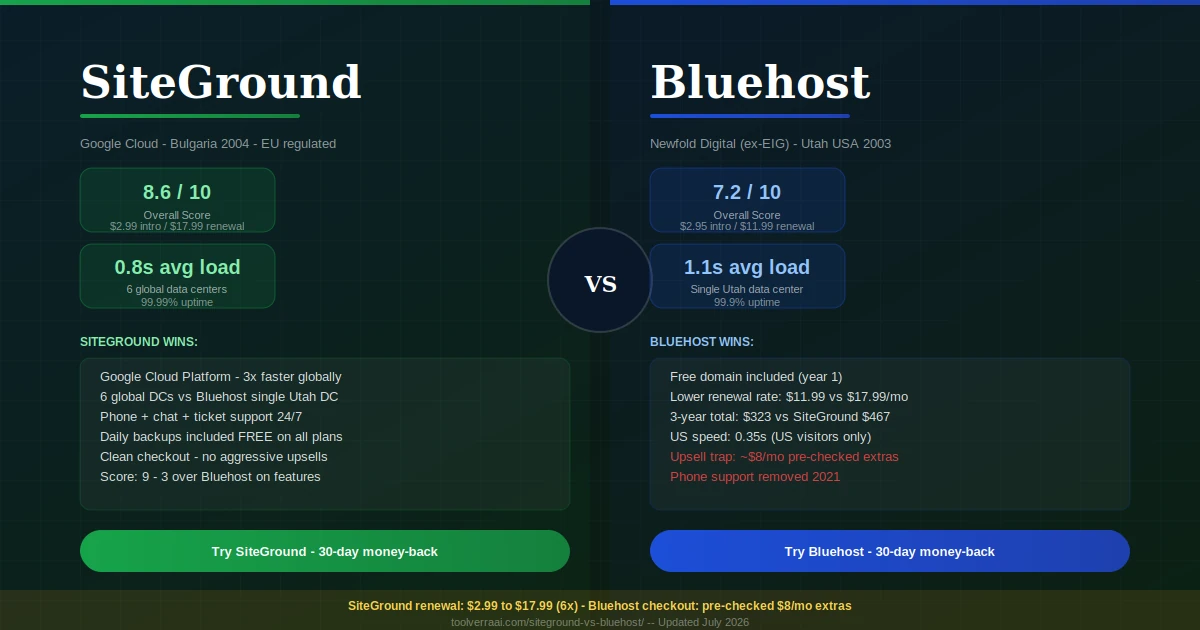
📊 SiteGround vs Bluehost 2026 — Quick Overview at a Glance
ThunderStack · SuperCacher · 6 global DCs
Single Utah DC · WordPress.org recommended
| Category | SiteGround 🟢 | Bluehost 🔵 | Winner |
|---|---|---|---|
| Intro price | $2.99/mo | $2.95/mo | Tie |
| Renewal price (entry) | $17.99/mo (6x!) | $11.99/mo (4.1x) | Bluehost 🔵 |
| 3-year total cost | $467 (StartUp) | $323 (Basic) | Bluehost 🔵 |
| Free domain | ❌ | ✅ Year 1 | Bluehost 🔵 |
| Free email | ✅ | ✅ | Tie |
| Free CDN | ✅ Cloudflare | Partial | SiteGround 🟢 |
| Free SSL | ✅ | ✅ | Tie |
| Daily backups | ✅ All plans | Paid (CodeGuard) | SiteGround 🟢 |
| Infrastructure | Google Cloud | Shared (EIG/Newfold) | SiteGround 🟢 |
| Data centers | 6 (US/UK/EU/AP) | 1 (Utah only) | SiteGround 🟢 |
| Avg page load | 0.8s (global) | 1.1s (global) | SiteGround 🟢 |
| Uptime | 99.99% | 99.9% | SiteGround 🟢 |
| Phone support | ✅ | ❌ (removed 2021) | SiteGround 🟢 |
| Upsell model | Clean checkout | Aggressive pre-checked | SiteGround 🟢 |
| Staging | GrowBig+ only | Choice Plus+ only | Tie |
| Money-back | 30 days | 30 days | Tie |
| Trustpilot rating | 4.7/5 | 4.0/5 | SiteGround 🟢 |
| Green hosting | ✅ Certified | ❌ | SiteGround 🟢 |
| Free migration | ✅ Plugin + team option | Misleading — $150 in practice | SiteGround 🟢 |
💰 Round 1: SiteGround vs Bluehost Pricing — Renewal Shock vs Upsell Trap
The SiteGround vs Bluehost 2026 pricing comparison has two traps — one for each provider. SiteGround’s trap is the renewal price shock: the StartUp plan’s $2.99/month intro price becomes $17.99/month at renewal — a 502% (6x) increase that is the steepest renewal jump among mainstream WordPress hosts. Bluehost’s trap is the checkout upsell: pre-checked add-ons for SiteLock security, CodeGuard backups, and domain privacy inflate the actual first-year bill well beyond the $2.95 headline.
On a pure 3-year cost basis, Bluehost Basic ($323) is approximately $144 cheaper than SiteGround StartUp ($467). But this comparison omits a critical feature difference: SiteGround StartUp includes daily backups on all plans. Bluehost Basic requires CodeGuard ($3/month) for automated backups. Add that to Bluehost’s 3-year cost and the gap shrinks to approximately $36 over 3 years — essentially nothing.
🟢 SiteGround — Real Pricing
| StartUp (intro) | $2.99/mo |
| StartUp (renewal) | $17.99/mo ⚠️ 6x |
| GrowBig (intro) | $4.99/mo |
| GrowBig (renewal) | $29.99/mo ⚠️ |
| GoGeek (intro) | $7.99/mo |
| GoGeek (renewal) | $44.99/mo ⚠️ |
| Daily backups | ✅ Included all plans |
| Free domain | ❌ Buy separately |
| Free CDN | ✅ Cloudflare |
| Staging | GrowBig+ only |
🔵 Bluehost — Real Pricing
| Basic (intro) | $2.95/mo |
| Basic (renewal) | $11.99/mo ⚠️ 4.1x |
| Choice Plus (intro) | $5.45/mo |
| Choice Plus (renewal) | $17.99/mo ⚠️ |
| Pro (intro) | $13.95/mo |
| Pro (renewal) | $28.99/mo ⚠️ |
| Daily backups (Basic) | Paid CodeGuard add-on |
| Free domain | ✅ Year 1 |
| Free CDN | Partial |
| Staging | Choice Plus+ only |
📊 3-Year Total Cost — SiteGround vs Bluehost (Entry Plans)
| Plan | Year 1 | Year 2 | Year 3 | 3-Year Total |
|---|---|---|---|---|
| SiteGround StartUp | $35.88 | $215.88 | $215.88 | $467.64 |
| Bluehost Basic | $35.40 | $143.88 | $143.88 | $323.16 |
| Bluehost + CodeGuard backups | $71.40 | $179.88 | $179.88 | $431.16 |
| Real gap (with CodeGuard) | ~$36 difference | |||
Source: HostFleet April 2026 pricing analysis. SiteGround Year 1 = 12-month prepay at intro rate. Years 2-3 at published renewal rates. CodeGuard = $3/mo additional.
⚡ Round 2: Speed & Performance — Real 2026 Data
The performance gap between SiteGround and Bluehost is real and meaningful. SiteGround runs on Google Cloud Platform with their custom SuperCacher technology — three levels of caching (static, dynamic, and Memcached object caching) that dramatically reduce server response times. Bluehost runs on traditional shared hosting infrastructure managed by Newfold Digital (formerly EIG) from a single data center in Utah, USA.
The Bluehost “0.35s” US load time circulated in some 2025 tests is genuinely impressive — but it reflects best-case US visitor performance only. A 90-day independent test (Truescho, April 2026) across multiple global locations found Bluehost averaging 1.1 seconds versus SiteGround’s 0.8 seconds. For US-only audiences, both are fast. For international audiences — European, Asian, or Latin American visitors — SiteGround’s multiple global data centers (US, UK, Germany, Netherlands, Singapore, Australia) give it a substantial structural advantage that no amount of caching can overcome on Bluehost’s single-DC setup.
🧩 Round 3: SiteGround vs Bluehost Features Comparison
Independent comparisons consistently score SiteGround 9-3 over Bluehost on features — the most decisive margin of any category. SiteGround includes daily backups, Cloudflare CDN, SuperCacher, and a clean plugin ecosystem on all plans. Bluehost’s Basic plan notably excludes automated backups (requires paid CodeGuard), limits storage to 10 GB, and restricts staging to higher tiers.
| Feature | SiteGround 🟢 | Bluehost 🔵 |
|---|---|---|
| Daily backups | ✅ All plans | Paid CodeGuard add-on on Basic |
| Free CDN | ✅ Cloudflare (all plans) | Partial integration |
| Caching system | SuperCacher (3 levels) | Basic shared cache |
| Staging | GrowBig+ only | Choice Plus+ only |
| Free domain | ❌ | ✅ Year 1 |
| Unlimited websites | GrowBig+ only | Choice Plus+ only (Both limit entry) |
| Git/SSH | ✅ | ✅ |
| WP auto-updates | ✅ | ✅ |
| Plugin blacklist | Some restrictions | Fewer restrictions |
| Data center choice | ✅ Choose at signup | Auto-assigned Utah |
| Green hosting | ✅ Certified | ❌ |
| Free migration | ✅ Plugin + support option | Claimed free, $150 in practice |
🎧 Round 4: SiteGround vs Bluehost Customer Support
SiteGround’s support has been rated industry-leading for years — and 2026 data confirms it holds. Phone support, 24/7 live chat with approximately 2-minute response times, and a ticket system all included on every plan. The support team is consistently praised for technical depth and patience with beginners. Trustpilot rating of 4.7/5 reflects this across thousands of verified reviews.
Bluehost removed phone support in 2021 — a move widely criticized in the hosting community. Current support is 24/7 live chat and tickets only. Response quality is rated acceptable but not exceptional, with Trustpilot at 4.0/5. The most common support complaint: long wait times during peak hours and resolution quality varies significantly by agent. For beginners who may need hand-holding through DNS changes, email configuration, or WordPress errors, SiteGround’s support advantage is genuinely important.
🔌 Round 5: WordPress & WooCommerce
Both providers are officially recommended by WordPress.org, but in practice SiteGround’s WordPress integration runs deeper. The Site Tools WordPress manager handles 1-click installation, automatic updates, staging (GrowBig+), caching configuration through SG Optimizer, and the SuperCacher layers. SiteGround also offers dedicated WooCommerce hosting plans with pre-configured performance settings. Bluehost’s WordPress integration is functional but relies more heavily on standard plugins and settings that require manual configuration for optimal performance. For WooCommerce specifically, SiteGround’s Google Cloud infrastructure handles dynamic checkout pages more reliably under load — though for low-traffic stores, both are adequate.
📖 Need more power for WooCommerce? See our Cloudways vs SiteGround comparison — Cloudways delivers dedicated cloud resources for high-traffic WooCommerce stores that both SiteGround and Bluehost can’t match on shared hosting.
🔒 Round 6: SiteGround vs Bluehost Security
SiteGround includes a comprehensive security stack on all plans: AI anti-bot system, Web Application Firewall (WAF), ClamAV malware scanning, Cloudflare CDN with DDoS protection, and automatic backups. All security features are active without additional cost or manual configuration. Bluehost’s base security is adequate — SSL, basic firewall, and malware detection — but advanced security features (SiteLock Pro malware scanning, CodeGuard backups) are paid add-ons that Bluehost aggressively promotes during checkout. The security gap is meaningful: SiteGround’s included WAF and daily backups replace tools Bluehost charges extra for.
⚠️ SiteGround vs Bluehost: The Bluehost Upsell Trap — Real Numbers
The most actionable fact in the SiteGround vs Bluehost 2026 comparison for budget-conscious buyers: Bluehost’s checkout pre-checks multiple paid add-ons. Many buyers sign up thinking they’re paying $2.95/month and discover their first invoice is significantly higher. Here are the add-ons commonly pre-checked:
Bluehost Checkout — Common Pre-Checked Add-Ons
🎯 SiteGround vs Bluehost — Who Should Choose Which?
🟢 Choose SiteGround If…
- You want better performance globally (0.8s avg)
- You have international visitors outside the US
- You want phone support and excellent 24/7 help
- You want daily backups included without add-ons
- You care about green/eco-certified hosting
- You want a clean checkout without upsell traps
- You’re building a WordPress or WooCommerce site
- Long-term cost is manageable at renewal rates
🔵 Choose Bluehost If…
- Year-1 cost is your primary constraint
- You need a free domain included (SiteGround doesn’t offer one)
- Your audience is almost exclusively US-based
- You want to avoid SiteGround’s 6x renewal price jump
- You’re building a basic site with low traffic expectations
- You’re comfortable managing your own backups via plugins
🔧 SiteGround vs Bluehost Migration Guide
Bluehost → SiteGround
- Sign up for SiteGround and choose your data center closest to your primary audience. SiteGround lets you pick during checkout — a distinct advantage over Bluehost’s auto-assignment.
- Install SiteGround’s free WordPress migration plugin on your existing Bluehost site. It’s available in the WordPress plugin repository and automates file, database, and media transfer.
- Run the migration. Enter your SiteGround SFTP credentials and let the plugin transfer everything. Most sites complete in 15-30 minutes.
- Test on SiteGround’s temporary URL before updating DNS. Check all pages, forms, and WooCommerce checkout if applicable.
- Update DNS at your domain registrar to point to SiteGround. DNS propagates in 24-48 hours. Keep Bluehost active for 48 hours during propagation.
SiteGround → Bluehost
Use the All-in-One WP Migration plugin (free, export up to 512 MB) to export from SiteGround and import to Bluehost. For larger sites, the premium version handles unlimited file sizes. Note that Bluehost’s “free migration” claims should be verified upfront — community reports suggest this service results in a $150 charge in many cases. Using the plugin yourself avoids this ambiguity entirely.
🏢 SiteGround vs Bluehost — Company Background & Trust Questions
Is SiteGround a Russian company? No. SiteGround was founded in Sofia, Bulgaria in 2004. Bulgaria is a European Union member state and NATO ally. SiteGround is incorporated in Bulgaria, operates under EU law and GDPR regulations, and runs its infrastructure on Google Cloud Platform globally. It has no Russian ownership, investment, or operational connections of any kind.
Is Bluehost an Israeli company? No. Bluehost was founded in 2003 in Provo, Utah, USA by Matt Heaton and Danny Ashworth. It was acquired by Endurance International Group (EIG) in 2010, and EIG rebranded to Newfold Digital in 2021. Newfold Digital is a US-incorporated company. Bluehost has no Israeli ownership or operational ties. The misconception may relate to general internet rumors that circulate about several major hosting brands.
🎯 SiteGround vs Bluehost 2026 — Key Takeaways Summary
- SiteGround wins overall — faster globally (0.8s vs 1.1s), 99.99% uptime, phone support, Google Cloud infrastructure, daily backups included, clean checkout, 9-3 feature score
- Bluehost wins on year-1 price and free domain — only two genuine advantages over SiteGround in 2026
- SiteGround’s renewal shock is real and steep — $2.99/mo intro → $17.99/mo renewal (6x, 502% increase)
- Over 3 years including CodeGuard backups, the real price difference between platforms is approximately $36 — not $144 as headline comparison suggests
- Bluehost’s single Utah data center is a fundamental disadvantage for non-US audiences — no caching overcomes geographic latency
- Bluehost’s aggressive checkout upsells add ~$8/month if not manually unchecked — real entry cost is often $10-11/mo, not $2.95
- Bluehost’s “free migration” claim is disputed — community reports consistent $150 charges. SiteGround’s free plugin migration is genuinely free
- SiteGround is NOT Russian — founded 2004, Sofia Bulgaria, EU-regulated, Google Cloud infrastructure
- Bluehost is NOT Israeli — founded 2003, Provo Utah USA, owned by Newfold Digital (ex-EIG)
- For serious WordPress sites, WooCommerce, or international audiences: SiteGround is the clear choice despite higher renewal pricing
FAQ — SiteGround vs Bluehost 2026
Need a Better Hosting Alternative to Both?
Both SiteGround and Bluehost have real limitations. Get a free expert audit to find the right hosting for your specific site, traffic, and budget.
Get Your Free Hosting Recommendation →📚 Related Hosting Guides on ToolVerraAI