
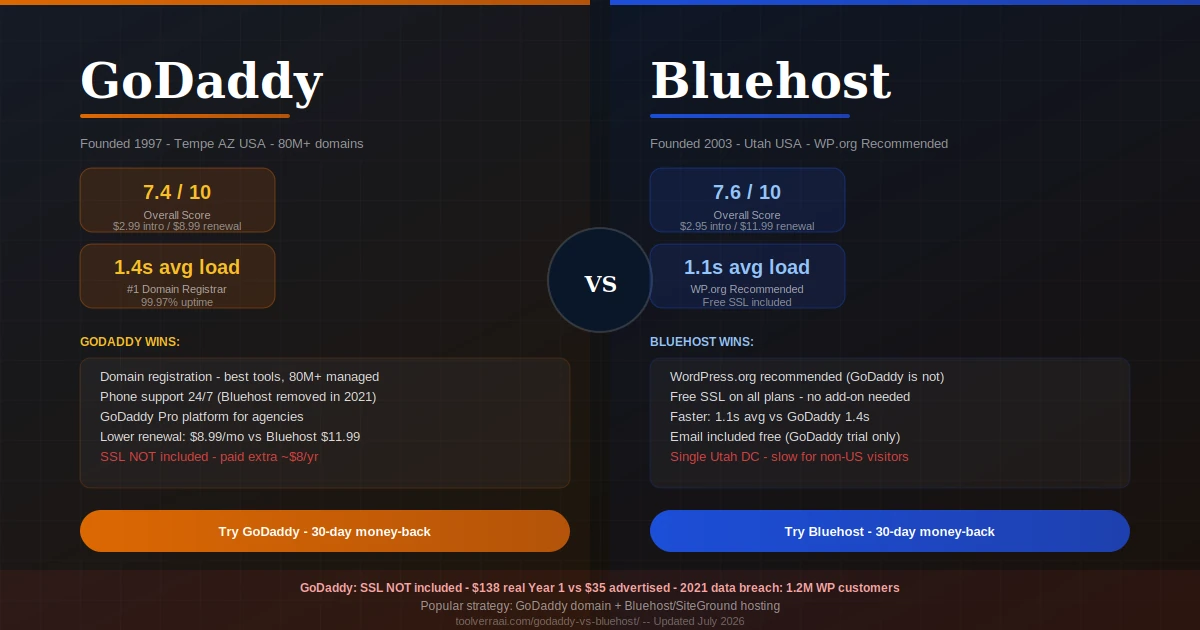
- Quick Overview — GoDaddy vs Bluehost at a Glance
- Round 1: Pricing — Hidden Costs Exposed
- Round 2: Speed & Performance
- Round 3: Features Comparison
- Round 4: WordPress Hosting
- Round 5: Security — The SSL Gap
- Round 6: Customer Support
- The Real Cost — Upsell Traps Side by Side
- Who Should Choose Which?
- Who Should Avoid Each Host?
- Migration Guide
- The GoDaddy Controversy — What You Need to Know
- FAQ
- Final Verdict
The GoDaddy vs Bluehost decision seems straightforward from the outside — both start at under $3/month, both give you a free domain, both are household names in web hosting. Look closer and the differences are significant: different infrastructure, different upsell strategies, different performance characteristics, and one important fact that most comparison articles skip: WordPress.org officially recommends Bluehost but does not recommend GoDaddy. That single endorsement carries weight for anyone building on WordPress.
This GoDaddy vs Bluehost guide gives you 6 tested rounds, honest upsell math that shows what you actually pay, and the section no competitor includes: who should avoid each host.
📊 GoDaddy vs Bluehost — Quick Overview
80M+ domains · #1 Domain Registrar
Newfold Digital (ex-EIG) · WP.org Recommended
| Category | GoDaddy 🟠 | Bluehost 🔵 | Winner |
|---|---|---|---|
| Intro price | $2.99/mo | $2.95/mo | Tie |
| Renewal price | $8.99/mo (3x) | $11.99/mo (4.1x) | GoDaddy 🟠 (lower renewal) |
| Free domain | ✅ Year 1 | ✅ Year 1 | Tie |
| Free SSL | ❌ Paid add-on | ✅ Included | Bluehost 🔵 |
| Avg page load | ~1.4s | ~1.1s | Bluehost 🔵 |
| Uptime | ~99.97% | ~99.9% | GoDaddy 🟠 (slight) |
| WordPress.org rec. | ❌ Not recommended | ✅ Recommended | Bluehost 🔵 |
| Phone support | ✅ 24/7 | ❌ Removed 2021 | GoDaddy 🟠 |
| Free email | 30-day trial only | ✅ Included | Bluehost 🔵 |
| Free CDN | ❌ | Partial Cloudflare | Bluehost 🔵 |
| Daily backups | Paid CodeGuard | Paid on Basic | Both require add-on |
| Money-back | 30 days | 30 days | Tie |
| Domain management | Best-in-class | Basic | GoDaddy 🟠 |
| Data breach history | 2021: 1.2M affected | None major | Bluehost 🔵 |
| Upsell aggressiveness | Extreme | Aggressive | Both problematic |
💰 Round 1: GoDaddy vs Bluehost Pricing — Hidden Costs Exposed
The GoDaddy vs Bluehost pricing comparison is more nuanced than the headline prices suggest. GoDaddy’s renewal rate ($8.99/mo for Economy) is lower than Bluehost’s ($11.99/mo for Basic), which makes GoDaddy cheaper over 3 years on the hosting bill itself. But GoDaddy doesn’t include SSL — a security certificate that Bluehost provides free. Adding GoDaddy’s SSL ($8/yr) and real email costs erases that advantage quickly.
The bigger issue for both hosts is checkout upsell aggressiveness. GoDaddy is the more extreme offender — SSL, domain privacy, CodeGuard backups, and SiteLock security are all presented as add-ons during checkout, and the UX is designed to confuse. Bluehost pre-checks CodeGuard and domain privacy during checkout. Both inflate your real first-year bill substantially above the advertised entry price.
🟠 GoDaddy — Real Pricing
| Economy (intro) | $2.99/mo |
| Economy (renewal) | $8.99/mo ⚠️ 3x |
| Deluxe (intro) | $4.99/mo |
| Deluxe (renewal) | $11.99/mo ⚠️ |
| Free SSL | ❌ Paid ~$8/yr |
| Free domain | ✅ Year 1 |
| Domain renewal (.com) | $22+/yr ⚠️ |
| Email (after trial) | ~$3.99-6/mo paid |
| Backups (CodeGuard) | Paid add-on |
🔵 Bluehost — Real Pricing
| Basic (intro) | $2.95/mo |
| Basic (renewal) | $11.99/mo ⚠️ 4.1x |
| Choice Plus (intro) | $5.45/mo |
| Choice Plus (renewal) | $17.99/mo ⚠️ |
| Free SSL | ✅ Included all plans |
| Free domain | ✅ Year 1 |
| ✅ Included | |
| Backups (Basic) | Paid CodeGuard |
| Pre-checked add-ons | ~$8/mo if unchecked |
💸 GoDaddy vs Bluehost — What You ACTUALLY Pay Year 1
| Item | GoDaddy Economy | Bluehost Basic |
|---|---|---|
| Hosting (12-month prepay) | $35.88 | $35.40 |
| SSL certificate | $8.00/yr (not included) | FREE |
| Domain privacy (WHOIS) | ~$10/yr add-on | ~$12/yr pre-checked |
| Email (real cost) | ~$48/yr (after 30-day trial) | FREE (included) |
| Backups (CodeGuard) | ~$36/yr add-on | ~$36/yr pre-checked |
| Real total (all add-ons) | ~$138/yr | ~$83/yr |
| Advertised total | $35.88/yr | $35.40/yr |
GoDaddy is significantly more expensive in Year 1 because SSL and email are not included. Bluehost is cheaper Year 1 but has a higher renewal rate from Year 2 onward.
⚡ Round 2: GoDaddy vs Bluehost Speed & Performance
Bluehost consistently outperforms GoDaddy on page load speed across independent 2026 tests. Cybernews’ testing found Bluehost LCP at 872ms versus significantly higher figures for GoDaddy. A 90-day test (Truescho April 2026) confirmed GoDaddy averaging approximately 1.4 seconds versus Bluehost’s 1.1-second global average. Under concurrent load testing simulating 50 simultaneous visitors, Bluehost maintained more consistent response times than GoDaddy. GoDaddy’s slight uptime advantage (99.97% vs 99.9%) doesn’t compensate for the speed disadvantage for most use cases.
🧩 Round 3: GoDaddy vs Bluehost Features
The features comparison in GoDaddy vs Bluehost depends heavily on what you’re building. For WordPress sites, Bluehost provides more out of the box — free SSL, included email, Cloudflare CDN partial integration, and a cleaner WordPress management interface. GoDaddy’s advantage is its domain ecosystem: the best domain search, the widest TLD selection, bulk domain management, and GoDaddy Pro — a free platform for agencies and developers managing multiple client domains and sites. If you’re running an agency that handles domains for clients, GoDaddy Pro is genuinely useful and Bluehost has no equivalent.
| Feature | GoDaddy 🟠 | Bluehost 🔵 |
|---|---|---|
| Free SSL | ❌ Paid ~$8/yr | ✅ All plans |
| Free email | 30-day Microsoft 365 trial | ✅ Included |
| Domain tools | Best-in-class (80M+ domains) | Basic |
| Website builder | GoDaddy Builder (strong AI) | WordPress-focused |
| WordPress integration | Managed WP (separate plan) | Built-in, WP.org endorsed |
| Agency tools | GoDaddy Pro platform | Limited |
| cPanel | ✅ (cluttered with upsells) | ✅ (cleaner) |
| Staging | Managed WP plans only | Choice Plus+ only |
| Free CDN | ❌ | Partial Cloudflare |
| 1-click WP install | ✅ | ✅ |
| Reseller hosting | ✅ Available | ❌ |
💡 Popular strategy: Many experienced website owners register their domain with GoDaddy (for the best domain tools) but host their site with Bluehost, SiteGround, or Cloudways. You get GoDaddy’s domain management + a better host’s performance. DNS transfer between registrar and host is straightforward and takes under 30 minutes.
🔌 Round 4: GoDaddy vs Bluehost WordPress Hosting
This is where the GoDaddy vs Bluehost comparison becomes most decisive. WordPress.org — the organization behind the world’s most popular CMS — officially recommends Bluehost on their hosting page. WordPress.org does not recommend GoDaddy. This distinction reflects real differences in WordPress compatibility, performance optimization, and integration depth. Bluehost’s entire infrastructure is designed around WordPress — automatic updates, specialized support, WP-CLI access, and managed WordPress plans that handle technical maintenance. GoDaddy offers WordPress hosting, but it’s a secondary product rather than their core focus, and optimization is less deep. For any site built on WordPress — blog, business site, WooCommerce store — Bluehost is the more appropriate choice of these two.
🔒 Round 5: Security — The SSL Gap
The most important security difference in GoDaddy vs Bluehost is one that few comparison articles emphasize clearly enough: GoDaddy does not include SSL certificates on base shared hosting plans. You must purchase SSL separately (~$8-10/year). Bluehost includes Let’s Encrypt SSL free on all plans. In 2026, HTTPS is a Google ranking signal and a basic trust requirement — any site without SSL displays security warnings in browsers. The fact that GoDaddy charges for this while Bluehost includes it represents a meaningful value gap.
The second significant security fact: GoDaddy suffered a major data breach in 2021 that exposed credentials and sensitive data for 1.2 million WordPress hosting customers. This breach — which included sFTP/database usernames and passwords — represents the most serious security incident either provider has experienced. It doesn’t disqualify GoDaddy as a host, but it’s a documented fact searchers asking “what is the GoDaddy controversy” deserve to know.
🎧 Round 6: Customer Support
GoDaddy retains 24/7 phone support — a channel Bluehost eliminated in 2021 under Newfold Digital’s cost-cutting. For users who prefer resolving technical problems by speaking to a human, this is a genuine GoDaddy advantage. Both provide 24/7 live chat. GoDaddy’s Trustpilot rating (3.9/5, based on a very high volume of reviews) and Bluehost’s (4.0/5) are comparable. Support quality for both platforms is generally rated adequate for beginners but less technically deep than specialist WordPress hosts like SiteGround or managed cloud hosts like Cloudways.
⚠️ GoDaddy vs Bluehost — Upsell Traps Side by Side
Both GoDaddy and Bluehost use upsell practices during checkout. GoDaddy is the more aggressive of the two. Here is exactly what each host tries to sell you beyond the base hosting plan:
| Add-on | GoDaddy 🟠 | Bluehost 🔵 |
|---|---|---|
| SSL Certificate | ~$8/yr — required for HTTPS | FREE — included |
| Domain Privacy | ~$10/yr add-on | ~$12/yr pre-checked |
| Backup (CodeGuard) | ~$3/mo add-on | ~$3/mo pre-checked on Basic |
| Security (SiteLock) | ~$3-6/mo add-on | ~$2-6/mo offered |
| 30-day trial, then ~$6/mo | Included free | |
| Domain renewal (.com) | $22+/yr after year 1 | Standard market rate |
🎯 GoDaddy vs Bluehost — Who Should Choose Which?
🟠 Choose GoDaddy If…
- You primarily need domain registration + management tools
- You’re an agency using GoDaddy Pro to manage client domains
- You want phone support available 24/7
- You’re building a simple site with GoDaddy’s AI Website Builder
- You want the widest TLD selection for international domains
- You need reseller hosting for client sites
- You already have an existing GoDaddy ecosystem (domains, email, etc.)
🔵 Choose Bluehost If…
- You’re building a WordPress website or blog
- You want free SSL included without add-ons
- You need email hosting bundled in your plan
- You’re a first-time website owner following WordPress.org guidance
- You want a cleaner control panel with fewer upsell interruptions
- You need better WordPress performance and automatic updates
- Budget is tight and you want to minimize add-on purchases
🚫 Who Should Avoid Each Host?
Avoid GoDaddy If…
- You’re building on WordPress and care about performance
- You don’t want to pay extra for SSL (basic security requirement)
- You’re budget-conscious — email and SSL add-ons inflate real costs significantly
- You were affected by or are concerned about the 2021 data breach
- You need faster global page load speeds
- You want a host optimized for WooCommerce
Avoid Bluehost If…
- Your audience is primarily outside the US (single Utah DC = slower globally)
- You need phone support (removed in 2021)
- You need staging environments — only available on Choice Plus+
- You want daily backups without paying extra on Basic
- You need serious developer tools (Git, Redis, SSH control) — consider Cloudways instead
- You’re building a high-traffic WooCommerce store — dedicated cloud resources needed
📖 Need better WordPress performance than either? See our SiteGround vs Bluehost comparison — SiteGround wins 9-3 on features and runs on Google Cloud Platform with 6 global data centers.
🔧 GoDaddy vs Bluehost Migration Guide
GoDaddy → Bluehost
- Sign up for Bluehost and choose your plan. Keep your domain at GoDaddy — you don’t need to transfer it. You’ll just point your domain’s DNS nameservers to Bluehost instead.
- Export your WordPress site from GoDaddy using the All-in-One WP Migration plugin (free up to 512 MB) or UpdraftPlus. Download the full backup to your computer.
- Install WordPress on Bluehost via the 1-click installer in your Bluehost control panel. Then install the same migration plugin and import your backup file.
- Test on Bluehost’s temporary domain. Bluehost provides a temporary URL while your domain still points to GoDaddy. Verify everything looks correct — pages, images, contact forms, and WooCommerce if applicable.
- Update your domain’s nameservers at GoDaddy. In your GoDaddy domain management panel, change nameservers from GoDaddy’s to Bluehost’s (ns1.bluehost.com / ns2.bluehost.com). DNS propagation takes 24-48 hours. Your site now loads from Bluehost.
Bluehost → GoDaddy
Use the same All-in-One WP Migration plugin to export from Bluehost. At GoDaddy, use their WordPress installer to create a fresh install, then import your backup. Update nameservers at your registrar to point to GoDaddy. Note that you’ll need to purchase SSL separately at GoDaddy if switching from Bluehost.
🔍 The GoDaddy Controversy — What Searchers Want to Know
Searches for “GoDaddy controversy” and “What are the cons of GoDaddy” consistently appear in the People Also Ask block for this comparison. Here are the honest answers:
The 2021 data breach: In November 2021, GoDaddy disclosed a security incident that exposed data for approximately 1.2 million WordPress hosting customers. Exposed information included email addresses, WordPress admin passwords, sFTP and database credentials, and SSL private keys for some customers. GoDaddy notified affected customers and reset compromised passwords, but the incident remains the largest security breach in the company’s history.
The upsell culture: GoDaddy has been criticized for years for checkout practices that present numerous add-ons — many of which are standard inclusions at competitors — as essential purchases. SSL (free at most hosts), email (free at most hosts), and backups (free at SiteGround) all cost extra at GoDaddy. This is by design, not oversight.
CEO history: GoDaddy’s founder Bob Parsons generated significant controversy in the early 2010s over various public statements and actions. Parsons stepped back from day-to-day operations and GoDaddy has undergone significant corporate culture changes since. This historical controversy no longer affects the current product or support quality.
Do people still use GoDaddy? Yes — GoDaddy remains the world’s largest domain registrar with over 80 million domains under management as of 2026. For domain registration specifically, GoDaddy is a legitimate and widely used choice. For web hosting, the consensus among experienced users is that GoDaddy’s hosting quality doesn’t match its domain dominance, and most recommend hosting elsewhere while keeping domains at GoDaddy if already established there.
🎯 GoDaddy vs Bluehost 2026 — Key Takeaways
- Bluehost wins for WordPress hosting — WordPress.org recommends Bluehost, not GoDaddy
- GoDaddy wins for domain registration — #1 registrar globally, best domain tools, GoDaddy Pro for agencies
- GoDaddy does NOT include SSL — a basic security requirement you must pay extra for (~$8/yr)
- Bluehost is faster: 1.1s avg load vs GoDaddy 1.4s; better under concurrent load
- GoDaddy has lower renewal rates ($8.99/mo) vs Bluehost ($11.99/mo) but higher real Year 1 cost due to SSL and email not included
- GoDaddy suffered a major 2021 data breach affecting 1.2 million WordPress hosting customers
- Both have aggressive upsells — GoDaddy is more extreme. Always uncheck pre-selected add-ons
- GoDaddy retains phone support; Bluehost removed phone support in 2021
- Popular strategy: register your domain with GoDaddy, host your site with Bluehost or SiteGround
- For better WordPress performance than either, consider SiteGround (Google Cloud, 6 global DCs) or Cloudways (dedicated cloud)
FAQ — GoDaddy vs Bluehost
Neither GoDaddy Nor Bluehost Is the Best WordPress Host
Both have real limitations. Get a free expert recommendation based on your actual site, traffic, and budget — we’ll tell you exactly which host is right for your use case.
Get Your Free Hosting Recommendation →📚 Related Hosting Guides on ToolVerraAI