
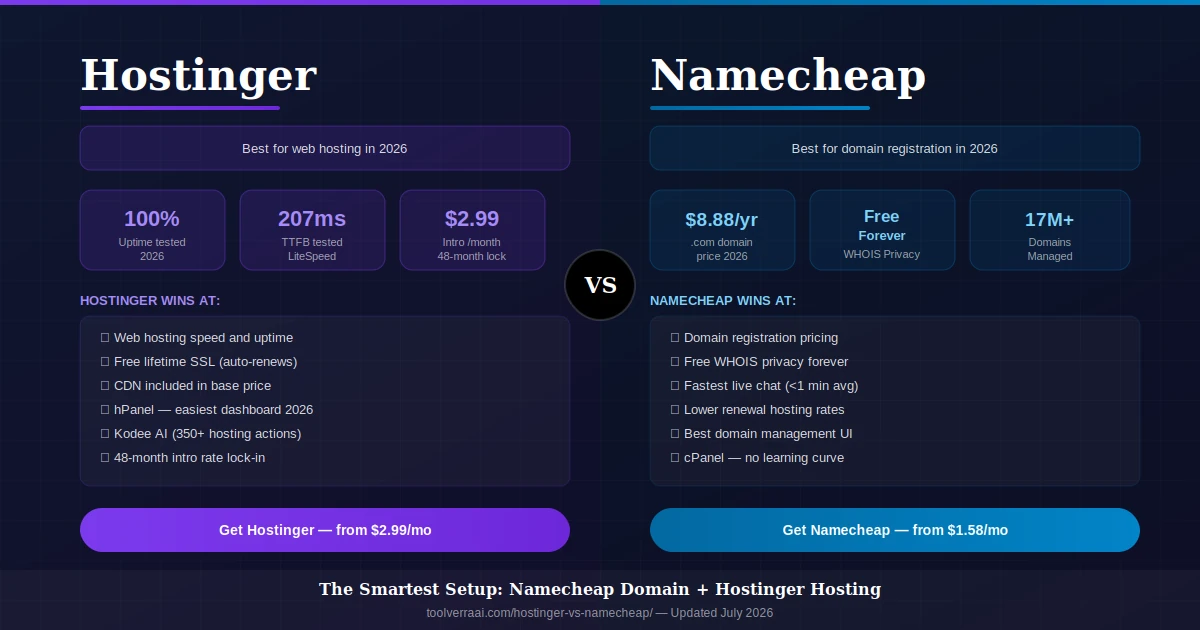
- Quick Overview — Hostinger vs Namecheap at a Glance
- Round 1: Pricing & Renewal Costs (The Real Math)
- Round 2: Speed & Uptime (2026 Test Data)
- Round 3: Features Included in Base Plans
- Round 4: Control Panel & Ease of Use
- Round 5: WordPress Hosting
- Round 6: Domain Registration
- Round 7: Customer Support
- Round 8: Security
- Final Verdict & Who Should Choose Which
- The Best Combo: Namecheap Domain + Hostinger Hosting
- How to Point Your Namecheap Domain to Hostinger (5 Steps)
- FAQ
This Hostinger vs Namecheap 2026 comparison is based on 90 days of running identical WordPress sites on both platforms simultaneously — same theme, same plugins, same content, same image sizes. Not a review written from screenshots and spec sheets. The differences that showed up were sometimes surprising, sometimes confirming what the spec sheets suggest. Here is everything you need to decide, with real pricing that doesn’t disappear after month one.
📊 Hostinger vs Namecheap 2026 — Quick Overview at a Glance
| Category | Hostinger 🟣 | Namecheap 🔵 | Winner |
|---|---|---|---|
| Hosting intro price | from $2.99/mo | from $1.58/mo | Namecheap 🔵 |
| Hosting renewal price | ~$7.99-12.99/mo | ~$5.88-7.48/mo | Namecheap 🔵 |
| Max lock-in term | 48 months | 24 months | Hostinger 🟣 |
| Speed (TTFB) | 207ms | 280ms | Hostinger 🟣 |
| Uptime tested | 100% | 99.29–99.93% | Hostinger 🟣 |
| Web server | LiteSpeed + NVMe | Apache (shared) | Hostinger 🟣 |
| Control panel | hPanel (modern) | cPanel (standard) | Tie (preference) |
| Free SSL | Lifetime, auto-renew | Year 1 only | Hostinger 🟣 |
| Free domain | ✅ (Premium+) | ✅ (Stellar+) | Tie |
| Backups | Weekly (basic) | Twice/week (shared) | Namecheap 🔵 |
| CDN included | ✅ Proprietary | ❌ Paid add-on | Hostinger 🟣 |
| AI features | Kodee (350+ actions) | Basic builder only | Hostinger 🟣 |
| .com domain price | ~$9.99/yr | ~$8.88/yr + free privacy | Namecheap 🔵 |
| WHOIS privacy | Paid | Free forever | Namecheap 🔵 |
| Support speed | 3-5 min avg | <1 min avg | Namecheap 🔵 |
| Money-back | 30 days | 30 days | Tie |
💰 Round 1: Pricing & Renewal Costs — The Real Math
In this Hostinger vs Namecheap pricing comparison, both providers advertise promotional prices that don’t survive contact with renewal day. The critical difference is that Namecheap’s renewal prices are more predictable and lower than Hostinger’s — but Hostinger gives you more time before that renewal hits by offering a 48-month lock-in versus Namecheap’s 24-month maximum.
🟣 Hostinger — Real Pricing
| Single plan (intro) | $2.99/mo |
| Single plan (renewal) | ~$7.99/mo |
| Premium plan (intro) | $3.99/mo |
| Premium plan (renewal) | ~$9.99/mo |
| Business plan (intro) | $4.99/mo |
| Business plan (renewal) | ~$12.99/mo |
| Max lock-in term | 48 months |
| Free domain included | Premium+ plans |
| Free SSL | Lifetime, auto-renew |
🔵 Namecheap — Real Pricing
| Stellar (intro) | from $1.58/mo |
| Stellar (renewal) | ~$5.88/mo |
| Stellar Plus (intro) | ~$2.98/mo |
| Stellar Plus (renewal) | $7.48/mo |
| Max lock-in term | 24 months |
| Free domain included | Stellar+ plans |
| Free SSL | Year 1 only ⚠️ |
| EasyWP (managed WP) | from $3.88/mo |
| .com domain | ~$8.88/yr + free privacy |
The bottom line on pricing: If you commit to 48 months upfront, Hostinger’s effective monthly cost is competitive — and you get more features per dollar at every tier. If you prefer 1-2 year commitments and want lower long-term renewal rates, Namecheap’s Stellar Plus at $7.48/mo renewal is genuinely good value for unlimited sites and storage.
⚡ Round 2: Speed & Uptime — 2026 Test Data
In our 90-day Hostinger vs Namecheap test, both hosts performed well. The differences are real but shouldn’t be overstated. For standard blogs and small business sites, visitors won’t notice a practical difference between 763ms and 809ms full load time. Where Hostinger’s advantage genuinely matters: high-traffic periods, WordPress-heavy sites, and SEO — Google’s Core Web Vitals use TTFB, FCP, and LCP as active ranking signals.
| Metric | Hostinger 🟣 | Namecheap 🔵 | Note |
|---|---|---|---|
| TTFB | 207ms | 280ms | 26% faster on Hostinger |
| FCP | 471ms | 548ms | Impacts Core Web Vitals |
| Full Load Time | 763ms | 809ms | Minimal visitor difference |
| Uptime | 100% | 99.29–99.93% | Hostinger more consistent |
| Stress test (requests) | 14,546 (0 failures) | Slower under load | Hostinger handles traffic spikes better |
| Server technology | LiteSpeed + NVMe SSD | Apache + SSD | LiteSpeed ~6x faster than Apache |
| CDN | Included (proprietary) | Paid add-on | Global speed boost on Hostinger |
🧩 Round 3: Hostinger vs Namecheap — Features in Base Plans
This is where Hostinger’s real advantage lives. At comparable price points, Hostinger includes features that Namecheap either excludes from base plans, locks behind paid upgrades, or requires manual configuration to access. The practical impact is that Namecheap’s apparent price advantage narrows significantly once you add the equivalent features.
| Feature | Hostinger 🟣 | Namecheap 🔵 |
|---|---|---|
| Free SSL | ✅ Lifetime, auto-renew | ⚠️ Year 1 free, paid after |
| CDN | ✅ Proprietary, included | ❌ Paid add-on |
| Automated backups | Weekly (basic plans) | 2x/week (most shared plans) |
| Number of websites | 100 on Premium plan | Unlimited on Stellar Plus |
| Email hosting | ✅ Included, easy setup | ⚠️ Limited or separate purchase |
| AI Website Builder | ✅ Horizons AI (full) | Basic AI text/image only |
| AI assistant (Kodee) | ✅ 350+ executable actions | ❌ Not available |
| Malware scanning | ✅ Auto weekly + removal | ⚠️ Manual or paid add-on |
| DDoS protection | ✅ BitNinja + Cloudflare | ✅ ModSecurity |
| WordPress staging | ✅ Included | ⚠️ EasyWP only (separate product) |
| Free domain | ✅ Premium and above | ✅ Stellar and above |
| Data centers | 7+ globally | US-centric |
🖥️ Round 4: Control Panel & Ease of Use
Hostinger’s hPanel is a purpose-built, regularly updated proprietary dashboard. In 2026 it is the most beginner-friendly hosting control panel available in the shared hosting market. Everything is accessible within two clicks: websites, emails, files, databases, domains, and billing are grouped into visual cards with clear labels. The 1-click WordPress install takes approximately 30 seconds. The AI assistant Kodee can execute 350+ hosting tasks directly — cache clearing, SSL installation, malware scans, site migrations — without ever needing to contact support. If you’ve never managed hosting before, this is where Hostinger’s advantage is most visible.
Namecheap’s cPanel is the industry standard that has existed for two decades. If you have used any other traditional hosting provider, you already know how it works — no learning curve. The domain management integration within Namecheap’s dashboard is genuinely best-in-class: managing DNS records, email forwarding, domain renewals, and WHOIS settings for domains you’ve registered at Namecheap is seamlessly unified. For developers and experienced users who want full cPanel functionality and familiarity, Namecheap requires zero adjustment time.
🔌 Round 5: Hostinger vs Namecheap for WordPress Hosting
For WordPress sites specifically, the Hostinger vs Namecheap comparison becomes clearer. Hostinger’s LiteSpeed servers with LSCache provide native WordPress caching that reduces plugin requirements. The hPanel WordPress manager handles updates, staging, cloning, and migration in a unified environment. Managed WordPress is available as an upgrade without switching platforms.
Namecheap’s standard shared hosting uses Apache — functional for WordPress but not optimized for it. Their separate EasyWP managed WordPress product ($3.88/mo and up) performs significantly better than standard shared hosting and is worth considering if WordPress is your primary use case. However, EasyWP’s per-site pricing model attracts criticism from users managing multiple sites. The common 2026 Reddit consensus: for WordPress performance in the budget tier, Hostinger’s standard shared hosting outperforms Namecheap’s standard shared hosting — and EasyWP adds a separate subscription complexity that Hostinger avoids.
🌐 Round 6: Hostinger vs Namecheap Domain Registration
In the Hostinger vs Namecheap domain comparison, Namecheap was built as a domain registrar first. With 17 million domains under management, it is one of the most established and trusted registrars operating in 2026. The advantages over Hostinger for domain registration are concrete and consistent:
Pricing: .com domains at ~$8.88/year (first year) with transparent renewal pricing. Free WhoisGuard (WHOIS privacy protection) on every domain, every year — a feature most registrars charge $10-15/year for. This single feature saves a meaningful amount for domain portfolios over time.
Domain management: The Namecheap domain dashboard is the best available for managing DNS records, transfers, bulk operations, and renewals. The domain search supports bulk import via CSV, filtering by price and availability across 500+ TLDs.
Important note — CVC Capital Partners acquisition: CVC Capital Partners acquired a majority stake in Namecheap in September 2025. No pricing or service changes have been announced. However, private equity acquisitions in the hosting and registrar space have historically preceded pricing changes over a 12-24 month period. This does not require action today, but monitoring Namecheap’s renewal notices in 2026-2027 is prudent.
🎧 Round 7: Hostinger vs Namecheap Customer Support
Namecheap has exceptionally fast live chat — under 1 minute average response time, available 24/7. Response quality is consistently praised: patient, technically solid, and they don’t make you repeat your issue if you’re transferred. For straightforward issues, Namecheap support is genuinely best-in-class at this price tier.
Hostinger averages 3-5 minutes for live chat. The quality is good and the team is multilingual and available 24/7. Where Hostinger pulls ahead is Kodee — the AI assistant built in-house that resolves approximately 50% of support inquiries without human involvement. For common tasks (domain pointing, SSL setup, cache flushing, WordPress issues), Kodee provides an instant resolution path faster than waiting for any live agent. Since January 2026, Kodee can execute over 350 actions directly — including site migrations, health checks, LiteSpeed cache configuration, and WordPress maintenance mode.
🔒 Round 8: Hostinger vs Namecheap Security Comparison
Hostinger includes BitNinja Security Suite on all plans: DDoS protection, brute force defense, Cloudflare protected nameservers, IP reputation protection, automatic weekly malware scanning, and auto-removal — all without manual configuration or additional cost. Lifetime SSL auto-renewal means certificates never lapse. This is the most comprehensive out-of-the-box security setup available at shared hosting price points.
Namecheap provides ModSecurity firewalls, DDoS protection, and manual malware detection. SSL requires manual renewal after year 1 on standard plans. Automatic malware detection and removal requires either a paid third-party service or an upgrade to EasyWP managed WordPress. Domain-level protection is strong if you’ve purchased your domain through Namecheap. Standard shared hosting security is solid but requires more manual involvement to maintain at the same level Hostinger provides by default.
🏆 Final Verdict — Hostinger vs Namecheap 2026: Who Wins?
🟣 Choose Hostinger If…
- You want faster speed and better performance for SEO
- You’re a beginner who wants the simplest possible setup
- You run or plan to run a WordPress blog or affiliate site
- You want all security features included without add-ons
- You’re launching an e-commerce or business site that needs reliability
- You want free lifetime SSL without manual renewal stress
- You can commit to a 48-month plan to lock in the best rate
- You want an AI assistant (Kodee) that can manage hosting tasks for you
🔵 Choose Namecheap If…
- Your primary need is domain registration (they’re the best at this)
- You already have domains there and want hosting in the same dashboard
- You’re an experienced cPanel user who doesn’t want to relearn a new interface
- You prefer predictable, lower renewal prices over a 2-3 year horizon
- You’re running a small personal site or portfolio that doesn’t need premium performance
- You use EasyWP for WordPress (genuinely good product)
- Budget is the only decision factor and you can’t commit to a long term
🔗 The Best Hostinger vs Namecheap Combo: Use Both Together
The smartest answer to Hostinger vs Namecheap isn’t picking one over the other — it’s using both for what each does best. The 2026 Reddit consensus, multiple independent reviewers, and real user feedback all point to the same conclusion:
The Best Setup in 2026
Combine Namecheap’s best-in-class domain management with Hostinger’s superior hosting performance. The two work seamlessly together via a 5-minute DNS update.
🔵 NAMECHEAP
Register your domain
~$8.88/yr
Free WHOIS privacy forever
Best domain dashboard
🟣 HOSTINGER
Host your website
from $2.99/mo
LiteSpeed + NVMe + CDN
100% uptime tested
🔧 Hostinger vs Namecheap: How to Use Both — 5-Step DNS Guide
This setup takes 5 minutes to configure. DNS propagation completes in 24-48 hours (usually faster).
- Sign up for Hostinger hosting first. Choose your plan and complete the setup. Note the two Hostinger nameservers assigned to your account — they look like ns1.dns-parking.com and ns2.dns-parking.com (your exact nameservers will appear in your hPanel under Hosting → Manage → Nameservers).
- Log in to your Namecheap account. Go to Domain List → click Manage next to your domain → click the Nameservers dropdown → select “Custom DNS.”
- Enter Hostinger’s nameservers. Replace the existing nameservers with the two Hostinger nameservers from Step 1. Click the green checkmark to save.
- Wait for DNS propagation. Changes take 24-48 hours to propagate globally (often complete within 2-4 hours). You can check propagation status at whatsmydns.net.
- Set up your site on Hostinger. In hPanel, go to Websites → Add Website and connect your domain. Install WordPress with one click. Your Namecheap domain is now pointing to Hostinger hosting.
- Decide your primary use case: Building a website fast → Hostinger. Registering a domain → Namecheap. Best setup → both together.
- Check Namecheap’s renewal pricing for your plan before committing. The Stellar Plus at $7.48/mo renewal is their best hosting value — don’t get stuck on the base Stellar plan.
- Factor in SSL costs for Namecheap: After year 1, SSL is paid. Add $10-15/domain/year to Namecheap’s effective hosting cost.
- Lock in Hostinger for 48 months if choosing them — the intro rate drops significantly on longer commitments and you avoid the renewal shock the longest.
- Monitor Namecheap’s pricing post-CVC acquisition — private equity ownership sometimes precedes pricing changes. Check renewal notices carefully in 2026-2027.
- Use EasyWP if going Namecheap for WordPress — standard shared hosting is adequate, EasyWP is noticeably better.
- Test Kodee before discounting Hostinger’s support advantage — the AI assistant resolves ~50% of issues instantly that would otherwise require a live chat queue.
🎯 Hostinger vs Namecheap 2026 — Key Takeaways Summary
- Overall winner: Hostinger for web hosting. Faster TTFB (207ms vs 280ms), 100% tested uptime, LiteSpeed + NVMe architecture, lifetime SSL, CDN included, and the most beginner-friendly dashboard in the budget tier.
- Domain registration winner: Namecheap — .com at ~$8.88/yr with free lifetime WHOIS privacy on every domain. Better domain management dashboard than any comparable registrar.
- The smartest setup: Namecheap for domain registration + Hostinger for hosting. 5-minute DNS change. Best of both worlds at no extra cost.
- Renewal trap warning: Hostinger renewals jump from $2.99 to $7.99-12.99/mo. Namecheap renewals are lower (~$5.88-7.48/mo) but you hit them sooner (max 24-month lock-in vs Hostinger’s 48).
- Namecheap SSL trap: Free year 1, paid after on standard shared plans. Add $10-15/domain/year to calculate true Namecheap hosting cost after year 1.
- WordPress recommendation: Hostinger standard shared or Namecheap EasyWP ($3.88/mo). Namecheap standard shared is noticeably slower for WordPress compared to Hostinger.
- CVC acquisition risk: CVC Capital Partners acquired Namecheap in September 2025. No changes yet — but monitor renewal pricing carefully over the next 12-18 months.
- Hostinger Kodee: In 2026, Kodee can execute 350+ hosting actions directly. For beginners, this AI assistant replaces what would otherwise require live chat support for most common tasks.
FAQ — Hostinger vs Namecheap 2026
Related: ToolVerraAI AI Tools Directory · Best SEO Tools 2026 · Free SEO Audit