
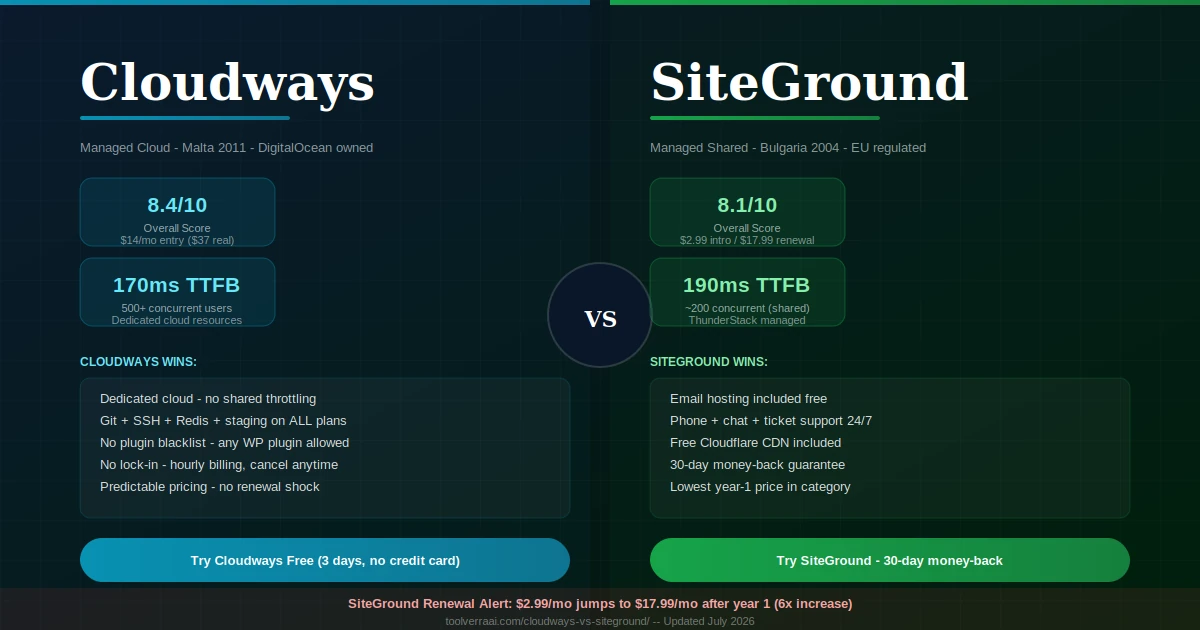
- Quick Overview — Cloudways vs SiteGround at a Glance
- Round 1: Pricing — The Renewal Price Shock Explained
- Round 2: Speed & Performance (Core Web Vitals)
- Round 3: Features & Developer Tools
- Round 4: Control Panel — Console vs Site Tools
- Round 5: Security
- Round 6: Customer Support
- Round 7: WordPress & WooCommerce
- Round 8: E-Commerce Under Load
- Decision Matrix — Which One Is Right for You?
- Migration Guide — Moving Between Platforms
- Company Background (Is SiteGround Russian? Is Cloudways Pakistani?)
- FAQ
- Final Verdict
The Cloudways vs SiteGround 2026 comparison is one of the most searched hosting decisions in 2026 — and it is one where most comparison articles get the framing wrong. They treat it as “which host is faster” when the actual decision is “which type of hosting infrastructure do I need?” Cloudways is managed cloud hosting: dedicated resources on DigitalOcean, Vultr, AWS, or Google Cloud that belong entirely to you. SiteGround is managed shared hosting: a faster, better-managed version of traditional shared hosting where resources are still pooled, albeit with smarter allocation than budget hosts.
Understanding this structural difference makes the rest of the Cloudways vs SiteGround decision straightforward. This Cloudways vs SiteGround guide gives you 8 scored rounds of comparison, real Core Web Vitals data for both platforms, the SiteGround renewal price calculator nobody publishes, and a decision matrix that tells you which to choose based on your actual use case.
📊 Cloudways vs SiteGround 2026 — Quick Overview at a Glance
DigitalOcean / AWS / GCP / Vultr / Linode
Proprietary infrastructure · ThunderStack
| Category | Cloudways 🔵 | SiteGround 🟢 | Winner |
|---|---|---|---|
| Entry price | $14/mo (real: ~$37) | $2.99/mo intro | SiteGround 🟢 (intro) |
| Renewal price | ~$37-40/mo stable | $17.99-44.99/mo jump | Cloudways 🔵 (predictable) |
| Resource type | Dedicated cloud | Managed shared | Cloudways 🔵 |
| TTFB tested | ~170ms | ~190ms | Cloudways 🔵 (slight) |
| Uptime | 99.99% | 99.99% | Tie |
| Under heavy load | Handles 500+ concurrent | Throttles ~200 concurrent | Cloudways 🔵 |
| Free SSL | ✅ Let’s Encrypt | ✅ Let’s Encrypt | Tie |
| Free domain | ❌ | ❌ | Tie (neither!) |
| Free email | ❌ Paid add-on | ✅ Included | SiteGround 🟢 |
| Free CDN | ❌ Paid (Flexible) | ✅ Cloudflare CDN | SiteGround 🟢 |
| Phone support | ❌ Chat only | ✅ Phone + chat + tickets | SiteGround 🟢 |
| Money-back | ❌ (3-day trial) | ✅ 30 days | SiteGround 🟢 |
| Lock-in contract | None (hourly billing) | Annual required | Cloudways 🔵 |
| Git deployment | ✅ Native | ✅ Via SSH/toolkit | Tie |
| SSH access | ✅ Full terminal | ✅ Available | Tie |
| Staging | ✅ 1-click | ✅ GrowBig+ plans | Cloudways 🔵 (all plans) |
| Plugin blacklist | Minimal restrictions | Yes — some plugins blocked | Cloudways 🔵 |
| Green hosting | Varies by provider | ✅ Certified | SiteGround 🟢 |
💰 Round 1: Cloudways vs SiteGround Pricing — The Renewal Shock
SiteGround’s promotional pricing looks compelling — $2.99/month for StartUp versus Cloudways’ $14/month entry. But this comparison only holds for the first billing period. SiteGround’s renewal rates are among the highest in the industry: the StartUp plan jumps to $17.99/month at renewal, GrowBig to $29.99/month, and GoGeek to $44.99/month. These are 6x, 6x, and 5.6x increases respectively. Cloudways, in contrast, is a pay-as-you-go platform: the price you pay in month 1 is the same in month 24, with no lock-in contract and no renewal shock.
🔵 Cloudways — Pricing
| DO1GB entry | $14/mo |
| DO2GB (recommended) | $28/mo |
| DO4GB | $54/mo |
| Email hosting (add-on) | ~$4/mo |
| SafeUpdates (add-on) | $5/mo |
| Lock-in contract | None |
| Renewal price change | None |
🟢 SiteGround — Pricing
| StartUp (intro) | $2.99/mo |
| StartUp (renewal) | $17.99/mo ⚠️ |
| GrowBig (intro) | $4.99/mo |
| GrowBig (renewal) | $29.99/mo ⚠️ |
| GoGeek (intro) | $7.99/mo |
| GoGeek (renewal) | $44.99/mo ⚠️ |
| Email hosting | ✅ Included |
📊 3-Year Total Cost of Ownership — Cloudways vs SiteGround
| Plan | Year 1 | Year 2 | Year 3 | 3-Year Total |
|---|---|---|---|---|
| SiteGround StartUp | $35.88 | $215.88 | $215.88 | $467.64 |
| SiteGround GrowBig | $59.88 | $359.88 | $359.88 | $779.64 |
| Cloudways DO2GB + email | $384 | $384 | $384 | $1,152 |
| Cloudways DO1GB + email | $216 | $216 | $216 | $648 |
Note: SiteGround Year 1 uses intro pricing (12-month prepay). Years 2-3 use published renewal rates. Cloudways uses DO2GB ($28/mo) + email ($4/mo) = $32/mo × 12 = $384/yr.
⚡ Round 2: Speed & Performance
In the Cloudways vs SiteGround speed comparison, both platforms are fast — faster than the vast majority of shared hosting. The difference shows up under load. SiteGround’s ThunderStack (NGINX + PHP-FPM + Redis + SSD + Cloudflare CDN) delivers outstanding performance for sites under approximately 200 concurrent users. Above that threshold, shared hosting resource allocation begins to throttle. Cloudways’ dedicated server resources don’t throttle because you’re not competing with other customers for CPU or RAM.
| Metric | Cloudways 🔵 (DO2GB) | SiteGround 🟢 (GrowBig) | Winner |
|---|---|---|---|
| TTFB | ~170ms | ~190ms | Cloudways 🔵 |
| LCP | 0.6-0.9s | 0.8-1.2s | Cloudways 🔵 |
| FCP | ~0.4s | ~0.5s | Cloudways 🔵 |
| Uptime | 99.99% | 99.99% | Tie |
| Max concurrent users | 500+ (dedicated) | ~200 (shared throttle) | Cloudways 🔵 |
| CDN included | Paid add-on (Flexible) | ✅ Cloudflare CDN free | SiteGround 🟢 |
| Caching stack | Varnish + Redis + Memcached | NGINX + Redis + SG Optimizer | Cloudways 🔵 (deeper) |
🧩 Round 3: Features & Developer Tools
Both platforms include staging environments, SSH access, and Git-based deployment — but the implementation depth differs significantly. Cloudways delivers these as first-class features: Git integration is native, staging is one-click on every plan, Redis/Memcached configuration is accessible through the console. SiteGround limits staging to GrowBig and above (not the entry StartUp plan), and some developer tools require more configuration through SSH compared to Cloudways’ console-based approach. The critical SiteGround feature gap: it maintains a plugin blacklist that blocks certain caching and security plugins (notably WP-Rocket compatibility limitations on lower plans) — Cloudways imposes minimal plugin restrictions.
| Feature | Cloudways 🔵 | SiteGround 🟢 |
|---|---|---|
| Staging environments | ✅ All plans | ✅ GrowBig+ only |
| Git deployment | ✅ Native integration | ✅ Via SSH/WP-Toolkit |
| SSH access | ✅ Full terminal + root SSH | ✅ Available (shared env) |
| Redis caching | ✅ Console-configurable | ✅ Enabled on higher plans |
| Multiple PHP versions | ✅ All versions (5.x-8.x) | ✅ 7.x-8.x supported |
| Plugin blacklist | Minimal restrictions | Some plugins blocked |
| WP-CLI | ✅ Available | ✅ Available |
| Multisite support | ✅ Per application | ✅ With configuration |
| Team collaboration | ✅ Multi-user access | ✅ Available |
| Website builder | ❌ | ✅ Site Tools builder |
| Email hosting | ❌ Paid add-on | ✅ Included |
| Free CDN | ❌ (Flexible plan) | ✅ Cloudflare CDN |
| Automated backups | ✅ Hourly/daily/weekly | ✅ Daily (30 copies GoGeek) |
🖥️ Round 4: Control Panel — Cloudways Console vs SiteGround Site Tools
In the Cloudways vs SiteGround control panel round, neither platform uses cPanel. Both built their own panels: Cloudways Console focuses on server/application management for developers, while SiteGround Site Tools focuses on website management for general users. The design philosophy difference is significant: Cloudways assumes you know what Varnish, Redis, and PHP-FPM are; Site Tools presents hosting management in terms non-technical users understand.
🔵 Cloudways Console
- Application-centric navigation
- Server-level settings accessible directly
- PHP version, PHP-FPM settings, OPcache
- Varnish/Redis toggle per application
- Team member access management
- Deployment via Git (native)
- Server monitoring graphs (New Relic integration)
- Add-on marketplace (SafeUpdates, malware, etc.)
🟢 SiteGround Site Tools
- Website-centric navigation
- Email management fully integrated
- WordPress toolkit (1-click install, updates, staging)
- SG Optimizer cache management
- cPanel-familiar layout for experienced users
- Security center (firewall, block lists, 2FA)
- Domain management + DNS editor
- Cloudflare CDN toggle (free, 1-click)
🔒 Round 5: Cloudways vs SiteGround Security
In the Cloudways vs SiteGround security round, both platforms provide strong, multi-layered security — but the implementations differ. Cloudways uses Imunify360 (server-level intrusion detection and malware scanning), PatchStack (WordPress vulnerability patching at WAF level), Fail2Ban (brute force protection), and Let’s Encrypt SSL. SiteGround uses their own AI anti-bot system, WAF (Web Application Firewall), ClamAV-based malware scanning, and Let’s Encrypt SSL with free Cloudflare CDN providing additional DDoS protection. SiteGround’s integration of Cloudflare CDN as default gives it a passive DDoS mitigation layer that Cloudways Flexible users have to configure separately. Cloudways’ Imunify360 provides deeper server-level scanning that SiteGround’s shared hosting environment can’t fully match.
🎧 Round 6: Cloudways vs SiteGround Support
In the Cloudways vs SiteGround support round, SiteGround has the best support of any hosting platform at its price point — bar none. Phone support, live chat, and ticket system operating 24/7, with approximately 2-minute average response times on chat. The support team is technically capable, patient with beginners, and handles WordPress-specific issues with genuine expertise. This is one of the most consistent positives in SiteGround’s user reviews across every platform (G2, Trustpilot, Reddit).
Cloudways offers 24/7 live chat with 30-60 second response times on the Flexible plan. Agents are technically competent, especially for server-level issues (PHP configuration, cache tuning, deployment problems). The known limitation: support quality declined following the 2022 DigitalOcean acquisition, and the $100/month Premium Support add-on is required for priority-level response for agencies with critical SLAs. Trial users cannot file tickets at all without upgrading.
| Support Channel | Cloudways 🔵 | SiteGround 🟢 |
|---|---|---|
| Live chat | 24/7 · 30-60s response | 24/7 · ~2 min response |
| Phone support | ❌ | ✅ |
| Ticket system | Paid plans only | ✅ All plans |
| Server-level support | ✅ (PHP, cache, infra) | WordPress-level only |
| Trial support | Limited | ✅ Full access |
| Premium support | $100/mo add-on | Included in higher plans |
🔌 Round 7: Cloudways vs SiteGround WordPress Hosting
For standard WordPress blogs, business sites, and portfolios: SiteGround GrowBig is the better value. It includes 1-click WordPress install, automatic updates, daily backups, and staging — all at a lower year-1 price with a 30-day money-back guarantee and phone support. For WordPress agencies, high-traffic blogs, or advanced configurations: Cloudways offers deeper control (Redis, Varnish, PHP version control, Git), no plugin restrictions, and dedicated resources that don’t throttle.
The plugin blacklist issue deserves specific mention. SiteGround restricts certain caching plugins on lower-tier plans, notably limiting some WP-Rocket functionality. On Cloudways, you can install and run any WordPress plugin — no restrictions. For sites that depend on specific plugin combinations (advanced caching setups, specific security tools), Cloudways’ open environment is a meaningful advantage.
🛒 Round 8: WooCommerce & E-Commerce Under Load
The Cloudways vs SiteGround WooCommerce battle is decisive: WooCommerce is uniquely demanding because checkout, cart, and user-session pages cannot be heavily cached — every request hits PHP and the database directly. In a shared hosting environment, this creates performance degradation under concurrent load. Under 200 simultaneous shoppers, SiteGround GrowBig performs well. Above that threshold, shared resource limits begin affecting checkout response times — the exact moment when a slow checkout costs you conversions (every 1 second slower in checkout reduces conversions by approximately 7%). Cloudways’ dedicated server resources mean your WooCommerce store’s CPU and RAM are never competing with other customers’ sites. The Redis object cache on Cloudways also specifically benefits WooCommerce by caching database objects across dynamic page requests.
📖 See also: Our Cloudways vs Hostinger comparison covers the WooCommerce dedicated resource advantage in full depth, including the 50,000-visitor upgrade framework.
🎯 Cloudways vs SiteGround Decision Matrix — Which Is Right for You?
🧭 Answer these questions to find your answer:
🔵 Choose Cloudways If…
- Traffic exceeds 50,000 monthly visitors
- Running WooCommerce with high concurrent orders
- Agency managing multiple client sites
- Need Git, SSH, Redis, staging on every plan
- Want predictable pricing with no lock-in
- You already have email and domain elsewhere
- Performance under load is a business-critical requirement
🟢 Choose SiteGround If…
- First website, no server management experience
- Need email, CDN, and support all bundled
- Want phone support available when needed
- Traffic is under 50,000 monthly visitors
- Need a 30-day money-back guarantee
- Green/eco-certified hosting matters to you
- Budget is the primary constraint for year 1
🔧 Cloudways vs SiteGround Migration — Moving Between Platforms
SiteGround → Cloudways
- Sign up for Cloudways and launch your server. Start the 3-day free trial (no credit card) at Cloudways.com. Choose DigitalOcean DO2GB ($28/mo) as your starting server. Provision takes 5-8 minutes.
- Install the Cloudways WordPress Migrator plugin on your existing SiteGround site. Available free in the WordPress plugin repository. Enter your Cloudways server’s SFTP credentials and database details from the Cloudways dashboard.
- Run the migration. The plugin transfers all files, database, and media automatically. For most sites under 2 GB, this completes in 10-15 minutes.
- Test on Cloudways’ temporary URL. Every Cloudways application gets a .cloudwaysapps.com staging URL. Test thoroughly before moving your domain.
- Update DNS at your domain registrar. Point your domain’s A record to your Cloudways server IP. DNS propagates in 24-48 hours. Keep SiteGround active until propagation is confirmed.
Cloudways → SiteGround
SiteGround offers a free WordPress migration service for new customers — handled by their support team. Alternatively, use the All-in-One WP Migration plugin to export your site from Cloudways and import it to SiteGround. The process follows similar steps: export, import to new host, test on SiteGround’s temporary domain, then update DNS.
🏢 Company Background — Addressing the Trust Questions
Two People Also Ask questions consistently appear for this comparison that no hosting article directly answers. Here they are:
Is SiteGround a Russian company? No. SiteGround was founded in Sofia, Bulgaria in 2004. Bulgaria is a European Union member state and NATO member. SiteGround has no Russian ownership, investment, or operational ties. The confusion likely stems from Eastern European geography associations. SiteGround operates data centers in the US, UK, Europe, and Asia-Pacific and is subject to EU GDPR regulations.
Is Cloudways a Pakistani company? Cloudways was founded in Malta in 2011 and is legally incorporated there. Its development and operations teams are based in Karachi, Pakistan. In 2022, DigitalOcean (a US company headquartered in New York) acquired Cloudways for approximately $350 million. Cloudways today operates as a Malta-incorporated subsidiary of a US-listed company with Pakistan-based operations. It is not a Pakistani company in the legal or ownership sense.
🎯 Cloudways vs SiteGround 2026 — Key Takeaways Summary
- Cloudways = managed cloud (dedicated resources). SiteGround = managed shared hosting. Different infrastructure, different use cases
- In the Cloudways vs SiteGround verdict, Cloudways wins for developers, agencies, and WooCommerce stores needing dedicated resources, Git, Redis, and no plugin restrictions
- SiteGround wins for beginners and small sites needing email, phone support, free CDN, and a 30-day money-back guarantee
- SiteGround renewal price shock is real — StartUp jumps from $2.99/mo to $17.99/mo at renewal. Always calculate year 2+ costs
- On a 3-year total cost view, the price difference between platforms is smaller than the headline comparison suggests
- Performance: both pass Core Web Vitals under normal load. Cloudways wins decisively above 200 concurrent users
- SiteGround has superior support (phone + chat + tickets, 30-day money-back). Cloudways has superior developer infrastructure
- SiteGround is NOT a Russian company — it is Bulgarian, founded 2004, EU-regulated
- Cloudways is NOT Pakistani — it is Malta-incorporated, owned by US-based DigitalOcean since 2022
- The plugin blacklist on SiteGround affects WP-Rocket and some security plugins on lower plans — Cloudways has no such restrictions
FAQ — Cloudways vs SiteGround 2026
Not Sure Which Hosting Is Right for Your Site?
Get a free expert audit of your current requirements and a clear recommendation based on your traffic, goals, and budget.
Get Your Free Hosting Recommendation →📚 Related Hosting Guides on ToolVerraAI