
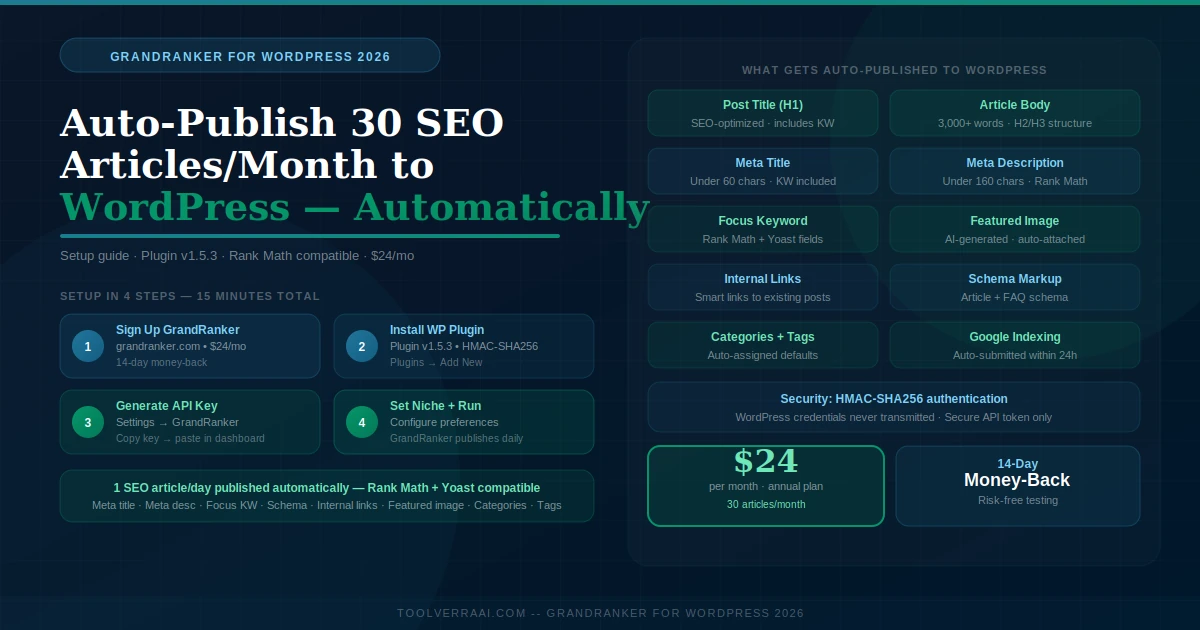
GrandRanker for WordPress lets you publish 30 SEO-optimized articles per month directly to your WordPress site — automatically. No copy-pasting, no formatting, no manual publishing. GrandRanker connects to WordPress via its official plugin (v1.5.3), authenticates securely with HMAC-SHA256, and publishes each article with title, meta description, focus keyword, categories, tags, schema markup, and featured image — ready for Rank Math or Yoast. This guide covers the full setup, how auto-publishing works, what gets published, and who should use it.
⚙️ How GrandRanker for WordPress Works
GrandRanker for WordPress is a complete automated content pipeline that runs independently once connected to your site. The workflow happens in four automatic stages every day:
Stage 1: Keyword Research
GrandRanker analyzes your WordPress site’s niche, existing content, and competitor landscape to identify low-competition keywords with buyer intent. It selects the best keyword for the day’s article automatically.
Stage 2: AI Article Writing
A 3,000+ word article is written targeting the selected keyword. GrandRanker researches the top 10 ranking pages, identifies content gaps, and writes an article structured to outperform them with proper H1/H2/H3 hierarchy.
Stage 3: On-Page SEO + Internal Linking
The article gets optimized: meta title, meta description, focus keyword assignment, schema markup, and smart internal links to previously published articles on your WordPress site — all automatically.
Stage 4: Auto-Publishing to WordPress
The completed article publishes directly to your WordPress dashboard via the GrandRanker plugin — with featured image, categories, tags, and SEO settings filled in. It appears in WordPress as a published post, indexed by Google within 24 hours.
🔧 Step-by-Step Setup — GrandRanker for WordPress
Create your GrandRanker account
Go to grandranker.com and sign up. Choose the annual plan ($24/mo) for best value — the 14-day money-back guarantee means you can test risk-free. Complete the onboarding: enter your site URL, niche description, target audience, and any specific topics or keywords to prioritize.
Install the GrandRanker WordPress plugin
In your WordPress dashboard, go to Plugins → Add New → search “GrandRanker” → Install and Activate. Alternatively, download the plugin from your GrandRanker dashboard and upload it manually via Plugins → Add New → Upload Plugin.
Generate your API connection key
After activating the plugin, go to Settings → GrandRanker in your WordPress dashboard. The plugin displays a unique API key. Copy this key — you’ll paste it into your GrandRanker dashboard to authorize the connection.
Connect WordPress in GrandRanker dashboard
In your GrandRanker account, go to Settings → CMS Connections → Add Site → WordPress. Paste your WordPress site URL and the API key from Step 3. GrandRanker will verify the connection — this takes about 30 seconds.
Configure publishing settings
Set your preferences: publishing schedule (GrandRanker publishes one article per day by default), default WordPress category for published articles, post status (Published or Draft — choose Published for full automation), and any content preferences (tone, avoid topics, focus areas).
GrandRanker runs automatically
Setup complete. GrandRanker now researches, writes, and publishes one SEO article per day to your WordPress site. Check your WordPress Posts section after 24 hours to see the first published article. Articles submitted to Google for indexing automatically within 24 hours of publishing.
📄 What Gets Published to WordPress — Full Breakdown
Every article GrandRanker publishes to WordPress includes the following elements automatically — no manual configuration required after initial setup:
| Element | Auto-Generated | Details |
|---|---|---|
| Post Title (H1) | ✅ Yes | SEO-optimized, includes target keyword |
| Article Body | ✅ Yes | 3,000+ words, H2/H3 structure, readable prose |
| Meta Title | ✅ Yes | Under 60 characters, Rank Math/Yoast compatible |
| Meta Description | ✅ Yes | Under 160 characters, includes keyword |
| Focus Keyword | ✅ Yes | Assigned to Rank Math/Yoast focus keyword field |
| Featured Image | ✅ Yes | AI-generated, relevant to article topic |
| Internal Links | ✅ Yes | Smart links to previously published posts |
| Schema Markup | ✅ Yes | Article schema, FAQ schema where applicable |
| Categories | ✅ Yes | Assigned to your configured default category |
| Tags | ✅ Yes | Relevant tags auto-generated per article |
| Permalink/Slug | ✅ Yes | SEO-friendly URL slug from title |
| Google Indexing Request | ✅ Yes | Submitted to Google within 24h of publishing |
📐 GrandRanker + Rank Math Integration
GrandRanker is fully compatible with Rank Math — the most popular WordPress SEO plugin for serious content sites. When GrandRanker publishes an article to WordPress, Rank Math automatically receives the focus keyword, meta title, and meta description in its dedicated fields. This means each article shows up in Rank Math’s content analysis with the correct keyword targeted from day one.
Yoast SEO is equally supported — all meta fields, focus keywords, and SEO settings populate in Yoast the same way. The GrandRanker plugin is tested and compatible with both plugins simultaneously if you’re running both on the same WordPress installation.
📈 Real Results — GrandRanker on WordPress Sites
Verified user results from GrandRanker’s published case studies: a new WordPress blogger reported approximately 12,000 monthly clicks within 3 weeks of starting. A WordPress-based Shopify store owner generated $48,900 in monthly sales within 90 days. A marketing agency replaced their $4,000/month content agency with GrandRanker for a WordPress site and reached approximately 9,000 monthly clicks in 90 days.
🎯 Who Should Use GrandRanker for WordPress
GrandRanker for WordPress is the right tool if:
You run a WordPress blog or content site and want to publish consistent SEO content without writing every post manually. You’re an affiliate marketer using WordPress who needs to scale to hundreds of buyer-intent articles without a writing team. You’re a SaaS founder with a WordPress blog who needs consistent SEO content to build topical authority but has no time to write. You’re a WordPress agency that wants to add a content automation layer to client site packages.
It’s not the right fit if your WordPress site is in a YMYL niche (health, legal, finance, medical) where every article needs expert review before publishing — GrandRanker’s automated output at scale needs a human review layer for these niches.
Automate Your WordPress SEO Content
GrandRanker publishes 30 SEO articles/month to your WordPress site automatically. $24/mo annual. 14-day money-back guarantee.
Start GrandRanker for WordPress →🎯 GrandRanker for WordPress — Key Takeaways
- GrandRanker connects to WordPress via its official plugin (v1.5.3) using HMAC-SHA256 secure authentication
- Setup takes approximately 15 minutes — install plugin, generate API key, connect in GrandRanker dashboard
- Every published article includes: title, meta description, focus keyword, H2/H3 structure, internal links, schema, featured image, categories, and tags
- Fully compatible with Rank Math and Yoast SEO — focus keywords populate in the plugin fields automatically
- 30 articles/month (1/day) published automatically — no copy-pasting, no formatting, no manual action after setup
- Articles submitted to Google for indexing within 24 hours of publishing
- Cost: $24/mo annual ($0.80/article) — 14-day money-back guarantee
- Rank Math tip: add a Paragraph block before any Custom HTML block so Rank Math reads keyword density correctly
- Best for: WordPress bloggers, affiliate sites, SaaS blogs, ecommerce content sites, local business sites
FAQ — GrandRanker for WordPress
📚 More GrandRanker Guides