
- Quick Answer — Start Here
- Why Free SEO Tools Are Enough for Beginners
- 1. Google Search Console — Must-Have #1
- 2. Google Analytics 4 — Must-Have #2
- 3. Ubersuggest — Best Free Keyword Research
- 4. Ahrefs Webmaster Tools — Best Free Backlink Tool
- 5. Rank Math Free — Best Free WordPress SEO Plugin
- 6. Google Keyword Planner — Free Volume Data
- 7. AnswerThePublic — Best for Content Ideas
- 8. Screaming Frog (Free) — Best Technical SEO Audit
- 9. Bing Webmaster Tools — Underrated Free Tool
- 10. Keyword Surfer — Best Free Chrome Extension
- 11. Semrush Free — Best Freemium Option
- 12. SEOquake — Best Free SERP Analyzer
- The Free SEO Tool Roadmap for Beginners
- FAQ
The best free SEO tools for beginners in 2026 can get your blog to its first 10,000 monthly visitors without spending a dollar. A January 2026 Reddit thread in r/digital_marketing with 189 comments reached a clear consensus: most beginners waste money on premium tools they don’t yet know how to use. Start with free SEO tools for beginners, master them, and upgrade only when your traffic growth demands more data.
This guide covers the 12 best free SEO tools for beginners in 2026 — what each one does, its real limitations, and exactly when to use it. Whether you are just starting a blog or optimizing your first website, these tools will give you everything you need. We have organised them in the order you should add them, starting on day one.
Quick Answer — Best free SEO tools for beginners 2026
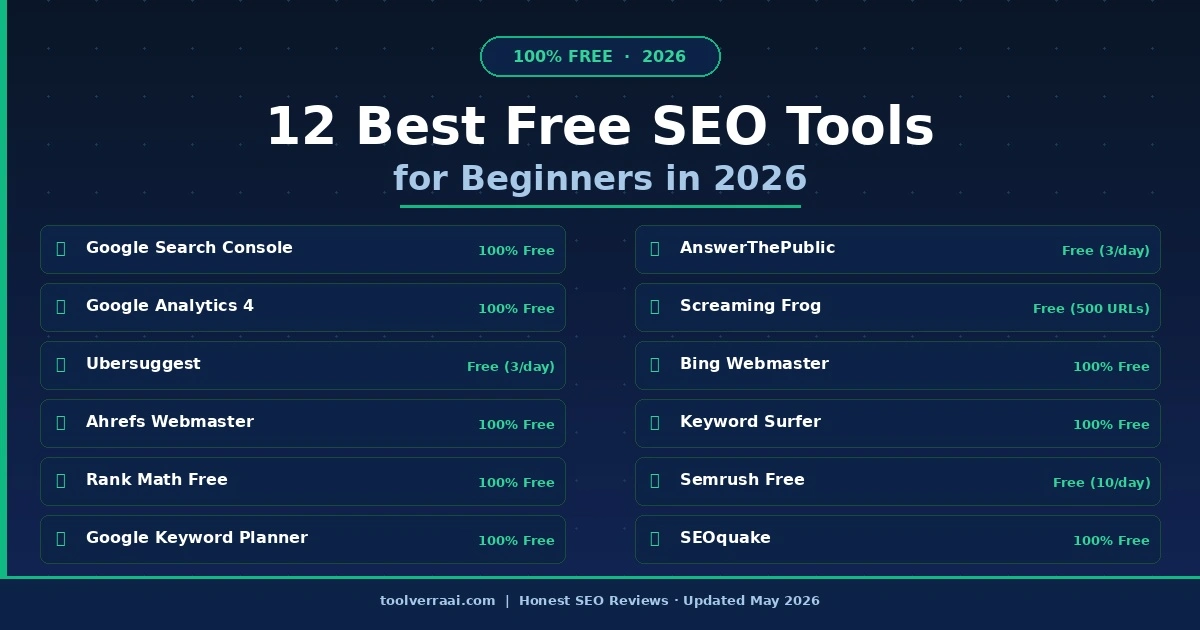
| # | Tool | Best For | Cost | Start When |
|---|---|---|---|---|
| 🥇 | Google Search Console | Performance monitoring | 100% Free | Day 1 |
| 🥈 | Google Analytics 4 | Traffic analysis | 100% Free | Day 1 |
| 🥉 | Rank Math Free | WordPress on-page SEO | 100% Free | Day 1 |
| 4 | Ubersuggest | Keyword research | Free (3/day) | Week 1 |
| 5 | Ahrefs Webmaster Tools | Backlink monitoring | 100% Free | Week 1 |
| 6 | Google Keyword Planner | Search volume data | 100% Free | Week 1 |
| 7 | AnswerThePublic | Content ideas & FAQs | Free (3/day) | Week 2 |
| 8 | Screaming Frog (Free) | Technical SEO audit | Free (500 URLs) | Month 1 |
| 9 | Bing Webmaster Tools | Bing SEO + Clarity | 100% Free | Week 1 |
| 10 | Keyword Surfer | In-SERP keyword data | 100% Free | Day 1 |
| 11 | Semrush Free | Competitor analysis | Free (10/day) | Month 1 |
| 12 | SEOquake | SERP analysis | 100% Free | Week 1 |
Why Free SEO Tools Are Enough for Beginners in 2026
The biggest myth in SEO is that you need expensive tools to rank. The reality: free SEO tools for beginners cover 80% of what you need. Every tool in this list has been chosen specifically because it delivers real results to drive your first 10,000 monthly visitors. Here is why:
- Google Search Console gives you data directly from Google — no paid tool can match its accuracy for your own site
- Ahrefs Webmaster Tools offers full backlink data for verified sites at zero cost
- Rank Math Free handles all on-page SEO that Yoast Premium charges $99/year for
- The free tiers of Ubersuggest and Semrush are sufficient for 3–10 keyword searches per day — enough for most new blogs
1. Google Search Console — The #1 Free SEO Tool for Beginners
Google Search Console (GSC) is the single most important free SEO tool for beginners in 2026. It provides data directly from Google about how your website performs in search — which keywords trigger your pages, how many clicks you receive, your average position, and any indexing or technical errors. No paid tool can replicate this accuracy because it comes straight from the source.
The Performance Report shows every search query that brought visitors to your site over the past 16 months. The Coverage Report flags pages Google cannot crawl or index. The Core Web Vitals Report tells you which pages have poor user experience scores affecting rankings. Among all free SEO tools for beginners, nothing else comes close to the value GSC provides.
✅ Pros
- 100% free — no limitations on your own site
- Accurate data direct from Google
- Tracks all keywords driving traffic
- Flags indexing and crawl errors immediately
- Core Web Vitals and mobile usability reports
- Submit sitemap directly to Google
❌ Cons
- Only shows data for your own verified sites
- No competitor keyword research
- Shows keyword ranges, not exact volumes
- Slight learning curve for true beginners
2. Google Analytics 4 — Free Traffic Analysis for Beginners
Google Analytics 4 (GA4) is the second essential tool for beginners. While GSC tells you how people find your site, GA4 tells you what they do once they arrive — which pages they read, how long they stay, where they leave, and where your traffic comes from (Google, social, direct, email).
For bloggers, GA4’s most valuable feature is identifying your top-performing content. You can see which posts drive the most organic traffic, which have the highest engagement rates, and which posts people abandon immediately — giving you a clear roadmap for what content to write more of.
✅ Pros
- 100% free with no data limits
- Shows complete user journey on your site
- Identifies top traffic sources
- Tracks conversions and affiliate link clicks
- Integrates directly with Google Search Console
❌ Cons
- Steep learning curve for beginners
- GA4 interface significantly changed from UA
- No SEO-specific keyword data
3. Ubersuggest — Best Free Keyword Research Tool for Beginners
Ubersuggest is the most popular free SEO tool for beginners doing keyword research beyond what Google provides. The free plan allows 3 searches per day — enough for most new bloggers to research and plan 20–30 articles per week. The Keyword Overview shows search volume, keyword difficulty (KD), CPC, and 100+ related keyword ideas.
One of Ubersuggest’s most valuable features for beginners is the Content Ideas section, which shows the top-ranked articles for any keyword, how many backlinks they have, and their estimated social shares. This lets you understand exactly what you are competing against before you write a single word. The lifetime deal at $120 one-time payment makes it the most cost-effective paid upgrade for bloggers planning a 2+ year project.
✅ Pros
- 3 free searches/day — enough for new bloggers
- Keyword difficulty scores for beginners
- Content Ideas shows competitor analysis
- Site audit tool included free
- $120 lifetime deal — best long-term value
- Very beginner-friendly interface
❌ Cons
- Only 3 free searches per day
- Data less accurate than Ahrefs/Semrush
- Backlink database smaller than competitors
4. Ahrefs Webmaster Tools — Best Free Backlink Tool for Beginners
Ahrefs Webmaster Tools is one of the most generous free tools available in 2026. After verifying your site, you get full access to Ahrefs’ industry-leading backlink database for your own domain — completely free. This includes every backlink pointing to your site, the Domain Rating (DR) of linking sites, and anchor text analysis.
You also get a Site Audit that checks 100+ technical SEO parameters, and organic keyword rankings showing which keywords your site currently ranks for in Google. For monitoring your own SEO health, Ahrefs Webmaster Tools is unmatched as a free tool at this level.
✅ Pros
- Industry’s best backlink data — completely free
- Full site audit (100+ checks)
- Keyword rankings for your domain
- Backlink index updated every 15–30 minutes
- No credit card required
❌ Cons
- Limited to your own verified sites only
- No competitor research on free plan
- Keyword research requires paid plan
5. Rank Math Free — Best Free WordPress SEO Plugin in 2026
Rank Math Free is the best free SEO tool for new bloggers using WordPress. It replaces Yoast Premium ($99/year) and All in One SEO Premium with a completely free alternative that includes: on-page optimization scoring, XML sitemap generation, Schema markup, breadcrumbs, redirect manager, and Google Search Console integration.
The 100-point SEO scoring system guides beginners step-by-step through optimizing each post — telling you exactly where to place your focus keyword, whether your meta description is the right length, and which Schema markup to add. Among all WordPress SEO tools, Rank Math has the steepest feature advantage over any paid alternative.
✅ Pros
- Completely free — replaces $99/yr Yoast Premium
- 100-point SEO scoring with actionable steps
- Schema markup for rich results
- Built-in redirect manager
- Google Search Console integration
- 5 focus keywords per post (free)
❌ Cons
- WordPress only
- Content AI requires paid plan
- Can feel complex for absolute beginners
6. Google Keyword Planner — Free Search Volume Data
Google Keyword Planner provides search volume ranges for any keyword — directly from Google. You need a Google Ads account to access it, but you do not need to run any ads. Simply create an account, skip the campaign setup, and access the keyword data tool for free.
The main limitation: volume data shows ranges (1K–10K) rather than exact numbers on the free tier. For beginners, these ranges are sufficient for content planning — if a keyword shows “100K–1M searches,” it is competitive. If it shows “100–1K,” it may be a low-competition long-tail opportunity worth targeting.
✅ Pros
- Data comes directly from Google — 100% accurate
- Unlimited keyword searches for free
- Shows seasonal trends and CPC data
- Excellent for discovering related keywords
❌ Cons
- Shows ranges, not exact volumes (free tier)
- Requires Google Ads account
- No keyword difficulty scores
7. AnswerThePublic — Best Free Content Idea Tool
AnswerThePublic is one of the best free SEO tools for beginners doing content planning. It reveals the exact questions your audience types into Google. Enter any topic and it generates a visual map of every question, preposition, comparison, and autocomplete suggestion people search on Google and Bing. This is real search data — not guesses — making it invaluable for planning FAQ sections and long-tail content.
For bloggers, AnswerThePublic is particularly powerful for building FAQ Schema sections — the questions it surfaces are exactly what Google uses for AI Overview answers. Writing content that directly answers these questions significantly increases the chances of appearing in AI search results.
✅ Pros
- Reveals real questions people ask Google
- Excellent for FAQ and long-tail content
- Visual format makes planning easy
- Covers questions, prepositions, comparisons
❌ Cons
- Only 3 free searches per day
- No search volume data on free plan
8. Screaming Frog (Free) — Best Free Technical SEO Audit Tool
Screaming Frog is the industry-standard technical SEO crawler. Its free version crawls up to 500 URLs — sufficient for most new blogs. It finds broken links, duplicate content, missing meta tags, redirect chains, thin content pages, and canonicalization issues that are invisible to beginners but actively hurt rankings.
Among all free tools, Screaming Frog is the most powerful for technical audits. Every blogger should run a monthly audit. Most professional SEO agencies use the paid version daily. The free tier gives beginners access to the same crawling engine with a URL limit that suits sites under 500 pages.
✅ Pros
- Industry-standard crawler — free up to 500 URLs
- Finds broken links and redirect chains
- Identifies missing/duplicate meta tags
- Desktop app — no account required
❌ Cons
- 500 URL limit on free version
- Steep learning curve for beginners
- Desktop only — no web version
9. Bing Webmaster Tools — The Most Underrated Free SEO Tool in 2026
Bing Webmaster Tools is the most underrated free SEO tool for beginners in 2026. Most bloggers ignore it — a mistake that costs them free SEO data. Most bloggers focus exclusively on Google and ignore Bing — but Bing powers Microsoft Edge, Cortana, and increasingly ChatGPT Search. Setting up Bing Webmaster Tools gets your content indexed on all these platforms simultaneously.
The hidden gem: Bing Webmaster Tools gives you access to Microsoft Clarity for free — a heatmap and session recording tool that shows exactly how visitors interact with your pages. Combined with SEO data, this gives beginners deeper insights than most paid tools provide.
✅ Pros
- Free SEO data from Bing + Edge + ChatGPT Search
- Microsoft Clarity (heatmaps) included free
- Keyword research tool built in
- Site audit and backlink reports
- Import GSC data directly
❌ Cons
- Bing has smaller market share than Google
- Less keyword data than GSC
10. Keyword Surfer — Best Free Chrome Extension for SEO
Keyword Surfer is a great free SEO tool for beginners — a Chrome extension showing keyword volume directly inside Google search results as you type. There is no need to switch between tabs or tools — just search normally on Google and see keyword metrics instantly alongside the results.
This works invisibly in your existing workflow. The extension also shows the estimated organic traffic of each ranking page in the SERP, helping you quickly assess competition before deciding whether a keyword is worth targeting.
✅ Pros
- Zero friction — works inside Google search
- Shows volume, CPC, and related keywords
- Competitor traffic estimates in SERP
- Completely free — no account needed
❌ Cons
- Chrome only
- Data less precise than paid tools
11. Semrush Free Plan — Best Freemium Option for Competitive Research
Semrush‘s free plan allows 10 searches per day — making it a practical free option for competitive research, domain analysis, and backlink tools. For beginners, 10 searches per day is genuinely sufficient to research competitor sites and find keyword opportunities. The Domain Overview — which shows any website’s estimated traffic, top keywords, and backlinks — is available on the free plan and is one of the most useful tools for competitive research.
✅ Pros
- 10 searches/day across all tools
- Domain Overview for any competitor site
- Keyword difficulty and volume data
- 14-day free trial available
❌ Cons
- 10 searches/day is restrictive
- Full data requires $139.95/month
12. SEOquake — Best Free SERP Analyzer
SEOquake adds SEO metrics to every Google search result page. For each result, you instantly see: Domain Authority, Page Authority, number of backlinks, age of the page, and social shares. This lets you quickly assess whether a keyword is realistic to rank for based on who is currently occupying the top spots.
✅ Pros
- Instant SEO data in Google SERP
- Shows DA/PA for each result
- On-page SEO audit in one click
- Chrome and Firefox supported
❌ Cons
- Data powered by Semrush — limited on free
- Can slow browser on large pages
The Free SEO Tool Roadmap for Beginners 2026
Do not install all 12 tools at once. Here is the exact order to add free tools in 2026. Following this roadmap ensures you build the right habits from day one as your blog grows:
Day 1 — The Non-Negotiable Foundations
Install Rank Math Free → Set up Google Search Console → Set up Google Analytics 4 → Install Keyword Surfer Chrome extension. These four tools cost nothing and give you the data foundation every blog needs from day one.
Week 1 — Add Keyword Research
Create free accounts on Ubersuggest and Semrush. Verify your site on Ahrefs Webmaster Tools. Set up Bing Webmaster Tools (takes 5 minutes — imports directly from GSC). Install SEOquake extension.
Week 2 — Add Content Planning
Use AnswerThePublic (3 searches/day) to find question-based content ideas. Use Google Keyword Planner for volume ranges. Start building content clusters around your main topics.
Month 1 — Technical Audit
Download Screaming Frog Free and run your first technical audit. Fix any broken links, missing meta descriptions, or redirect chains it finds. A clean technical foundation accelerates all other SEO efforts.
Month 3+ — Consider Upgrading
When you are publishing 3–5 posts per week and need unlimited keyword research, consider upgrading to Ubersuggest Lifetime ($120) or Semrush Pro ($139.95/month). Read our Semrush vs Ahrefs comparison before deciding.
Free SEO Tools for Beginners — FAQ
Ready to upgrade from free tools? Read our Semrush vs Ahrefs 2026 comparison to find the best paid SEO tool for your budget.