
- The Job-First Framework for Freelancer AI Tools
- Writing & Reasoning: Claude vs ChatGPT
- Research: Perplexity Pro
- Design: Canva Pro, Adobe Firefly
- Coding: GitHub Copilot
- Video & Audio: Descript, CapCut
- Admin, Invoicing & Time Tracking: FreshBooks, Wave
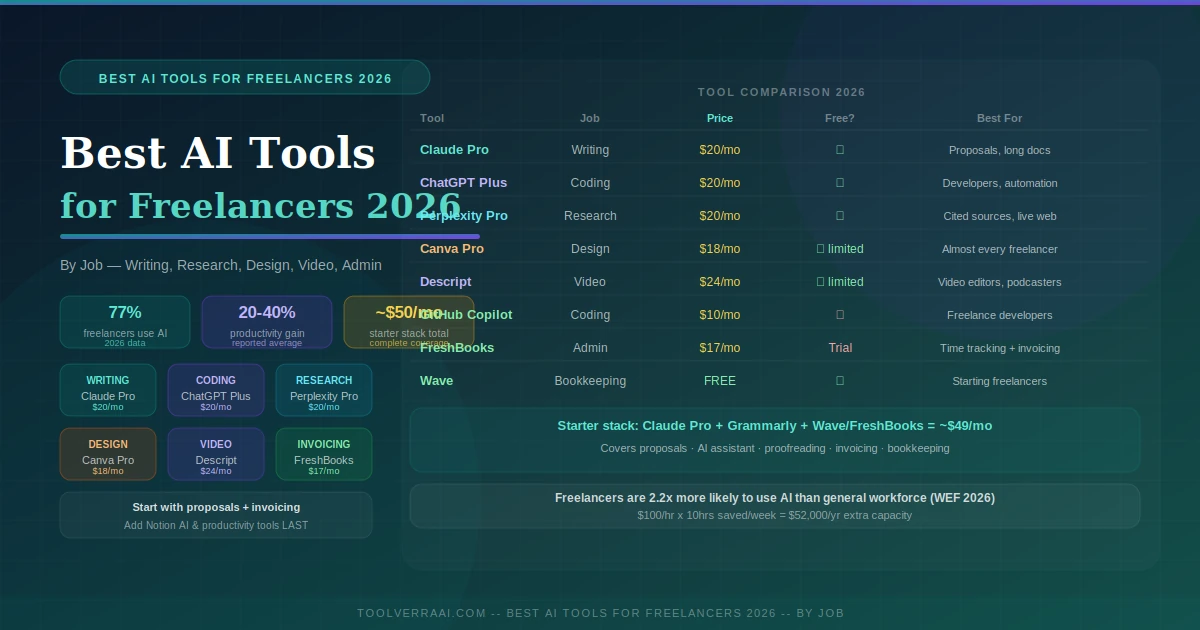
- Full Comparison Table
- Starter Stack — ~$50/Month
- Tools by Freelance Specialty
- FAQ
77% of freelancers now use AI tools in 2026, according to industry data — and those who do report 20–40% productivity gains. If you bill at $100/hour and save 10 hours a week with AI, that’s $52,000 per year in additional capacity before any rate increases. The best AI tools for freelancers are not the most popular ones — they’re the ones that directly address your highest time drains. For most freelancers, those are proposal creation and contract generation, not productivity apps or AI note-takers. This guide maps tools to the actual jobs freelancers do every week, with verified 2026 pricing and an honest starter stack that covers everything essential for around $50/month.
🗺️ Best AI Tools for Freelancers 2026 — The Job-First Framework
Most AI tools for freelancers articles list tools by category — “writing tools,” “design tools,” “productivity tools.” That’s the wrong starting point. The right question is: what job are you trying to get done, and which tool handles that job best? Every freelance week breaks down into the same core activities regardless of specialty. Map your biggest time drains to these jobs first, then choose tools accordingly.
Job 1
Proposals, emails, reports, contracts, long-form content
Job 2
Client industry, competitors, background info with sources
Job 3
Graphics, presentations, pitch decks, social assets
Job 4
Video editing, podcast production, course content
Job 5
Time tracking, invoices, late payment follow-up, bookkeeping
Job 6
Code completion, debugging, documentation, spec conversion
Job 7
Connecting tools, automating repetitive workflows
✍️ Writing & Reasoning: Claude Pro vs ChatGPT Plus
Writing and reasoning is the highest-leverage category of best AI tools for freelancers 2026 because it touches every other job: proposals, client emails, briefs, reports, and long-form content. Two tools dominate this space in 2026 at the same price point — and they solve different problems.
Claude Pro — Best for Long Documents & Nuanced Writing
Claude Pro is the strongest general-purpose writing tool among best AI tools for freelancers in 2026 in 2026, particularly for long documents, nuanced editing, and client-facing work where tone and judgment matter. It maintains context across long sessions better than most alternatives — essential when working through a 5,000-word proposal or editing a client’s report without losing coherence. Independent reviews consistently describe Claude’s output as sounding human and natural rather than formulaic. The free plan covers basic needs; Pro ($20/month) unlocks extended context and priority access. Claude Max is available for heavy users at a higher price point.
Strengths
- Best for long docs and nuanced reasoning
- Writes in a natural, non-formulaic style
- Strong context retention across sessions
- Excellent for proposals and client emails
- Free plan for starting freelancers
Limitations
- Less strong for coding vs ChatGPT
- Smaller plugin/custom GPT ecosystem
- Usage limits on free plan
ChatGPT Plus — Best for Coding, Automation & Broad Ecosystem
ChatGPT Plus matches Claude Pro in price ($20/month) but serves a different primary use case. Its developer tools are stronger — it handles code generation, debugging, API integration errors, and converting client briefs into structured specs with high reliability. The custom GPT ecosystem allows building specialized assistants for recurring freelance tasks: a custom proposal generator, a client intake processor, or an SEO brief generator. For freelance developers, ChatGPT Plus combined with GitHub Copilot ($10/month) covers the full coding workflow. For non-developers, Claude Pro is generally the better writing-focused choice.
Strengths
- Best for coding and developer workflows
- Massive custom GPT ecosystem
- Strong admin automation
- High execution speed
Limitations
- Formally styled writing by default
- Usage caps on peak models
- Less nuanced than Claude for long docs
🔍 Best AI Tools for Freelancers 2026 — Research: Perplexity Pro
Perplexity Pro is the cleanest answer for research among all best AI tools for freelancers in 2026. Unlike Claude or ChatGPT, which can hallucinate information confidently, Perplexity pulls live data from the web and cites every source — you can verify exactly where each fact comes from. The Spaces feature lets you save ongoing research projects per client, building a searchable reference library as you work. For freelancers who spend hours researching client industries before writing proposals or briefs, Perplexity Pro converts that process from hours of browser tab switching into a structured, sourced, reusable research workflow.
Strengths
- Every claim cited with a source
- Real-time web data (no training cutoff)
- Spaces for ongoing client research
- Faster than manual research
Limitations
- Less strong for creative writing tasks
- Free plan limits search depth
- Third tool at $20/mo — budget consideration
🎨 Design: Canva Pro & Adobe Firefly
Canva Pro — Best AI Design Tool for Most Freelancers
Canva Pro is the most universally useful AI design tool in the best AI tools for freelancers 2026 category in 2026. The 2026 Magic Studio upgrade added AI image generation, background removal, Magic Resize (automatically resize any design for any platform), and Magic Translate (localize designs across languages) — features that previously required separate subscriptions. For freelancers without formal design training, Canva Pro converts professional-quality design from a specialist skill into a 15-minute task. Note: Canva recently increased pricing from $15/month to $18/month — budget accordingly.
Adobe Firefly — Best for Commercial-Safe AI Image Generation
Adobe Firefly’s key differentiator is that it’s trained exclusively on licensed content — making it the safest choice for commercial client work where image copyright matters. At $5/month entry, it’s also the most affordable standalone AI image generator. For freelancers doing brand identity, marketing assets, or any deliverable where the client might use images commercially, Firefly’s licensing clarity is worth the extra consideration over free image generators.
💻 Best AI Tools for Freelancers 2026 — Coding: GitHub Copilot
GitHub Copilot is the most widely adopted AI coding tool among freelance developers in 2026. It integrates directly into VS Code and major IDEs, completing code in context, suggesting functions, and handling documentation generation. At $10/month, it’s the highest value-per-dollar of any specialized tool on this list. A React developer using Copilot alongside ChatGPT Plus ($20/month) has a complete AI development workflow for $30/month — starter scripts, debugging, API integration, and spec-to-code conversion all covered.
🎬 Video & Audio: Descript & CapCut
Descript — Best for Video-Focused Freelancers
Descript transforms video editing from a timeline-based technical skill into a text-editing task. You edit video by editing the transcript — delete a paragraph of text and the corresponding video footage disappears. Filler word removal is automatic. Voice cloning lets you fix audio mistakes by typing new text rather than re-recording. For freelancers who previously avoided video work because of the production time, Descript makes the entire post-production workflow fast enough to be practical for solo creators. The 2026 version is significantly more capable than its earlier iterations.
CapCut Pro — Best Budget Option for Social Video
CapCut Pro delivers excellent AI-assisted video editing for social content at ~$8/month — less than a third of Descript’s price. For freelancers producing short-form social video rather than long-form content, CapCut covers the essential workflow at a significantly lower cost. Choose Descript for professional video editing and podcast production; choose CapCut for social-first content creation.
🧾 Admin, Invoicing & Time Tracking
FreshBooks — Best AI Invoicing Tool for Freelancers
FreshBooks combines time tracking, invoicing, and basic accounting with an AI-powered payment prediction feature that identifies which clients are likely to pay late — giving you advance warning to follow up before the due date. The 2026 Trial Balance report update also makes year-end accounting more reliable. The Lite plan at $17/month (annual billing) is the right starting point. Two cautions: client limits on Lite are reached quickly for freelancers with 5+ active clients, and the promotional 90% discount for the first four months reverts to full pricing afterwards — budget for the full price from month five.
Wave — Best Free Accounting Starting Point
Wave is completely free for invoicing and bookkeeping — covering the essential financial workflows for freelancers until transaction volume justifies upgrading to FreshBooks. The AI automation handles basic bookkeeping categorization. Start with Wave, upgrade to FreshBooks when you consistently have 5+ active clients and need the time tracking and payment prediction features.
📊 Best AI Tools for Freelancers 2026 — Full Comparison Table
| Tool | Job | Price | Free Plan | Best For |
|---|---|---|---|---|
| Claude Pro | Writing & reasoning | $20/mo | ✅ | Proposals, long docs, client writing |
| ChatGPT Plus | Writing & coding | $20/mo | ✅ | Coding, automation, custom GPTs |
| Perplexity Pro | Research | $20/mo | ✅ | Cited research, client industry |
| Grammarly Pro | Proofreading | $12/mo annual | ✅ Basic | Grammar, tone, polish |
| Canva Pro | Design | $18/mo | ✅ Limited | Almost every freelancer |
| Adobe Firefly | Image generation | From $5/mo | Limited | Commercial-safe images |
| GitHub Copilot | Coding | $10/mo | ❌ | Freelance developers |
| Descript | Video editing | $24/mo | ✅ Limited | Video editors, podcasters |
| CapCut Pro | Social video | ~$8/mo | ✅ | Short-form content creators |
| FreshBooks Lite | Admin/invoicing | $17/mo annual | ❌ (trial) | Time tracking + invoicing |
| Wave | Bookkeeping | Free | ✅ | Starting freelancers |
| Notion AI | Productivity | ~$8/mo add-on | ✅ Limited | Notes + project management (add last) |
🏗️ Best AI Tools for Freelancers 2026 — Starter Stack for Every Freelancer
📦 The Practical Freelancer AI Stack — $37-50/Month
🎯 Best AI Tools for Freelancers 2026 — By Specialty
Writers & Consultants
- Claude Pro $20/mo — long-form writing
- Perplexity Pro $20/mo — cited research
- Grammarly Pro $12/mo — polish
- Canva Pro $18/mo — pitch decks
- Total: ~$70/mo
Freelance Developers
- ChatGPT Plus $20/mo — code + automation
- GitHub Copilot $10/mo — IDE integration
- FreshBooks $17/mo — invoicing
- Notion AI $8/mo — project notes
- Total: ~$55/mo
Video & Content Creators
- Claude Pro $20/mo — scripts, briefs
- Descript $24/mo — video editing
- Canva Pro $18/mo — thumbnails, graphics
- CapCut $8/mo (social alternative)
- Total: ~$62-70/mo
Designers & Brand Specialists
- Claude Pro $20/mo — creative briefs
- Canva Pro $18/mo — design assets
- Adobe Firefly $5+/mo — images
- FreshBooks $17/mo — invoicing
- Total: ~$60/mo
📖 See also: Our Best AI Tools for Sales 2026 guide covers AI tools for the full sales motion — useful for freelancers building an outbound client acquisition process alongside their delivery workflow.
🎯 Best AI Tools for Freelancers 2026 — Key Takeaways
- 77% of freelancers use AI in 2026 — those who do report 20-40% productivity gains; freelancers are 2.2x more likely to use generative AI than the general workforce
- Choose tools by job, not by category — start with proposal creation and invoicing (direct revenue impact) before productivity apps
- Claude Pro ($20/mo) wins for long-form writing, proposals, and nuanced client communication — the most natural-sounding AI writing assistant in 2026
- ChatGPT Plus ($20/mo) wins for coding, automation, and the custom GPT ecosystem — better choice for freelance developers
- Perplexity Pro ($20/mo) is the best research tool — cites every source, pulls live web data, Spaces for per-client research libraries
- Canva Pro ($18/mo, recently increased from $15) covers design for almost every freelancer — Magic Studio 2026 adds AI images, resize, and translation
- FreshBooks Lite ($17/mo annual) handles invoicing + time tracking — note: 90% promo ends after 4 months, full price applies after
- Wave is free and covers bookkeeping until FreshBooks is justified — always start here before paying for invoicing tools
- Starter stack for most freelancers: Claude/ChatGPT Plus + Grammarly Pro + Wave/FreshBooks = $32-49/month total
- Add specialty tools only after the client-facing workflow is running — Notion AI and productivity apps belong at the end of the stack, not the beginning
FAQ — Best AI Tools for Freelancers
Want Help Building Your Freelance AI Stack?
Get a free consultation — we’ll map the right AI tools to your freelance specialty, highest time drains, and monthly budget.
Get Your Free AI Tools Audit →📚 Related AI Tools Guides on ToolVerraAI